Advertise

Friday, February 3, 2012

ROM Manager Premium v5.0.0.1 Apk


ROM Manager Premium v5.0.0.1 Apk | 1.9 MB | Mediafire
Requires Android:1.6 and up

Must have app for any root user. Make backups, flash ROMs, and own your device.

v5.0.0.1 update:
- ClockworkMod Touch Recoveries have been added to ROM Manager for select devices. Touch recoveries are FREE downloads on the ClockworkMod website, or as an in app purchase within ROM Manager. Your support is appreciated! This is beta, so report bugs!

ATTENTION: I have started the rollout of ClockworkMod Recovery 5 for some devices. It will have faster tar backups, and will properly preserve the filesystem type at time of backup. If CWR5 fails to flash try flashing again, that usually fixes it (bad flash). If you have any issues with CWR5, feel free to roll back to the previous version, and report the bug to me at koush@clockworkmod.com!

ROM Manager is THE MUST HAVE APP for any Android root user. (Over 3 million downloads and counting!)

* Flash your recovery to the latest and greatest ClockworkMod recovery.
* Manage your ROMs via a handy UI.
* Organize and perform backups and restores from within Android!
* Install ROMs from your SD card.
* Install your favorite ROMs over the air!

Premium Version:
* Premium ROMs
* Receive notifications for when your ROM is updated!
* Automatic backups
* Install from QR Code
* Web Connect
* Support

Why does ROM Manager ask for account permissions?
Web Connect only needs to access your Google account to connect it to your google account. It can't access any private data or passwords.


Download Or Download

Lair Defense v1.0.8 Apk


Lair Defense v1.0.8 Apk | 9.4 MB | Mediafire
Requires Android:1.6 and up

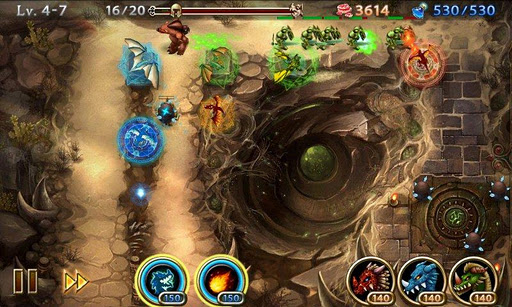
Amazing strategic/arcade tower defense! Way back in ancient history, when humans and dragons live in peace, the human emperor once heard eating dragon eggs will make one live forever. Since then, the war between humans and dragons has begun. You are the ONE to stop the greedy humans from stealing eggs and killing dragons.

v1.0.8 update:
- You can go back to normal mode once you reach nightmare.
- Please TURN SOUND OFF if the game still crashes on your device.

Dragons/Spells:
- Fire Dragon: Defends against invading enemies with fiery power. It is one of the most powerful and ancient creatures.
- Ice Dragon: A heroic defender specializes in ice attack. It can freeze invading enemies.
- Poison Dragon: Defends against invading enemies with poisonous power. Getting too near to it is horribly dangerous.
- You can raise dragon from young to adult and giant. Many special skills are only available for adult/giant dragon.
- Fire rain: special spell that damage an area by fire rain.
- Ice up: A spell that temporarily freeze all enemies.

Enemies:
- Varying from armless peasants to druids, the masters of magic power.
- Thieves move fast and become invisible as they like;
- Mage is immune to fire dragon attacks.
- Priest is the master of healing and prevervation. They can heal themselves quickly.
- ...
- And many more enemies are joining battle as level goes.

Command your dragons to stop greedy humans from stealing eggs now, HERO!

Download

Tuesday, December 27, 2011

GO Launcher EX v2.71 beta4 Apk App


Requirements: Android v2.1+
Overview: GO Launcher EX is the extended version of GO Launcher, one of the most popular home apps in Android Market. It’s a highly customizable home replacement application, which will run when you press your android phone’s HOME key. GO Launcher EX supports hundreds of themes, fast flip speed and tons of useful functions.

GO Launcher EX is the extended version of GO Launcher, one of the most popular home apps in Android Market. It’s a highly customizable home replacement application, which will run when you press your android phone’s HOME key.
GO Launcher EX supports hundreds of themes, fast flip speed and tons of useful functions.

Features:
- Hundreds of themes
- Fancy home screen transition
- Smooth scrolling experience
- Icon popup menu
- Folder and task manager in app drawer
- Gesture supported
- Scrollable & resizable widgets supported

Tips:
1. Pinch fingers to enter preview screen and edit home screen pages
2. Search “go launcher theme” to get themes and select them in “Themes preferences”
3. Set screen transition and flip speed in “Display settings”
4. Long press icons on home screen to active popup menu
5. Long press icons in app drawer to edit location, uninstall apps and create folders
6. If you can't set GO Launcher as your default home, download "Home manager"

Important:
1. This is a totally free application and we need directly call phone numbers permission to enable the direct dial shortcut on home screen.
2. We will bring out some charged apps like themes and widgets, but most of our apps are free!
3. The weather and clock widget in screenshots belongs to GO Weather, one of the applications developed by our team!
4. The other widgets in screenshots are our GOwidgets, try to search and download them in Android Market!
5. Download our “Classic Theme GO Launcher EX” to get the wallpaper!
6. GO Dev team has released GO Launcher EX, GO SMS, GO Weather and GO Contacts. More and more applications are coming soon!

Think of an extreme makeover to your phone? Try this out!

Recent changes:
1. (New) Supports high-resolution and 7/10 inch pads;
2. (Improve) Continue fix and rewrite toast info;
3. (Improve) If no enough room for adding GO widgets, highlight the selectable screens;
4. (Fix) Go to our blog after clicking the feedback button with a no-mail-apps phone;
5. (Fix) The auto-restart issue of changing icon size.

Download Instructions:
http://www.filesonic.com/file/nhAk39l

Mirror:
http://www.filefat.com/o6q0ohw1mz5n

ezPDF Reader v1.7.1.1 Apk App


Requirements: Android 2.1+
Overview: ezPDF Reader is the Best Selling and the Best Rated Multimedia PDF viewer, annotator, and form filler.

Customized Viewing
Clearly presented without the fluff, documents appear as they would on your PC, but customized to fit your mobile device's screen.
Scanned and text based PDFs are all supported, including JPEG2000 and JBIG2 compression.
Select Text Reflow, Fit to Text Column, Copy and paste text in PDF view and bookmark as you go or Change Reading Direction to ease reading

PDF Form Filler
Good for application forms, school tests, and contracts.
Fill out your Tax Form with ezPDF Reader.
Fill out the contract form, sign with Freehand, and send via email from the file manager (My docs).

Multimedia PDF Viewer - Audio, Video, and TTS (using built-in Text-to-Speech feature)
Get convenient, hassle-free PDFs directly to your Android device with ezPDF Reader.
It also plays multimedia files embedded into PDF.
Perfect solution for PDF based audio/video-enabled Ebooks, such as children's books and instructional books.
(Multimedia file format must be compatible to your Android device, However, no support for Flash)
Use Voice Reading feature to have documents read to you with the continuous automatic page-turning feature.
(It uses TTS feature of the hardware settings)

Annotation Features on PDF - No need to print for marking
Useful tool to add text in text box and sticky notes;
highlight, underline, or cross out texts; draw rectangles, ovals and freehand drawings.
Add memo & image, change color / thickness, resize and move them around as you like.
All these comments are compatible with Adobe® Acrobat®. (PC or Mac version)

Please download "ezPDF Reader Cloud Plugin" App for uploading and downloading files between Google Docs & ezPDF Readeer.

More Features
- Read text based PDF file (using built-in Text-to-Speech function (TTS)), Compatible with SVOX
- Play Embedded Video & Audio (Android device supported format)
- Text View with reflow function. Option for Night / Day Mode, Able to change font size and color (text and background)
- Thumbnail image view
- Support for landscape view
- Search (Options for case sensitive, whole word or part, exact word, and/or operator) and highlighted result
- Auto Fit Zoom for multi-column article or removing white margin
- Scroll lock / unlock
- Able to select text in PDF, save to clipboard, web search, share with other apps
- Support hyperlinks (Go to page within the PDF, URL links to webpage)
- Open Standard Password-protected PDF (Important! If the file is protected with the DRM applied to PDF file, this would not open the file.)
- Intuitive bookmarking & viewing bookmarks with its description and ribbon & thumbnail image
- Auto Page Turn (in secs) or Auto Scroll (up a screen full)
- Table of Contents
- Zoom in & out (Pinch or double tap)
- Page navigation with thumbnail scroll images
- Jump to a specific page by its Page Number
- Able to change reading direction - Good for Arabic, Chinese, Japanese & Hebrew documents
- Undo & Redo button
- Support Trackball
- Page Turning Effect (Flip)
- FREE PDF Conversion Program for PC (link to download)
- 5-finger-tap : Annotation Tool On or Off
- 4-finger-tap : Notification Bar On or Off
- 3-finger-tap : PDF view or Text Reflow view
- 2-finger-tap : Reduces the page to fit the width when enlarged
- 1-finger-tap : Toggles Menu On or Off

What's in this version:
-Rendering Bugfix in specific PDF documents.

Download Instructions:
http://www.MegaShare.com/3809922

Mirrors:
http://www.filesonic.com/file/QNbXpB6
http://www.multiupload.com/LO50EMUK1R
Talking Tom Cat Free v1.6 Apk App


Requirements: Android v2.1+
Overview: Talking Tom repeats everything you say with a funny voice.

★★★ A Cat That Talks? ★★★
Talking Tom repeats everything you say with a funny voice. You can pet him, poke him, you can even grab his tail.

PLEASE NOTE: When running the app for the first time you will be required to download additional 3-25 MB to get the best graphics quality for your device.

Enjoy hours of fun and laughter with Talking Tom. He is especially fun for children of all ages.

Record your own videos of Tom and share them on YouTube & Facebook, send them by email/MMS (text) or save them to SD card.

★★★ How to Play: ★★★
✔ Talk to Tom and he will repeat everything you say with a funny voice.
✔ Pet his body or head to make him purr.
✔ Poke his head, belly or feet.
✔ Grab his tail.
✔ Pour a glass of milk for him to drink.
✔ Forget about him and he will yawn or sneeze.

★★★ Press Menu -> Settings to: ★★★
✔ Turn off the more violent actions
✔ Make him listen longer before repeating
✔ Clear the Facebook/YouTube login data

END-USER LICENSE AGREEMENT FOR ANDROID:
http://outfit7.com/eula-android/

Recent changes:
1.5: Best YouTube videos uploaded by users. Upvote videos you like or downvote videos you hate. Just press the video button to see the videos.

1.6: Talking Tom is now translated to 8 languages: Japanese, German, Chinese, Korean, French, Spanish, Italian and Portuguese
Less description »

Latest version: 1.6 (for Android version 2.1 and higher, supports App2SD)

Download Instructions:
http://www.filesonic.com/file/IDjHThe

Mirrors:
http://www.filefat.com/774r7s4ntbmw

SD cache:
http://www.filesonic.com/file/OH3IZbX
http://www.filefat.com/lf0548jn7r4y

Cool Reader v3.0.54-26 + Cool Reader Gold Donation Apk App


Requirements: Android v2.1+
Overview: eBook reader. Supports epub (non-DRM), fb2, doc, txt, rtf, html, chm, tcr, pdb, prc, mobi (non-DRM), pml formats.

eBook reader. Supports epub (non-DRM), fb2, doc, txt, rtf, html, chm, tcr, pdb, prc, mobi (non-DRM), pml formats.

Pages or scroll view. Page flipping animation.
Table of contents, bookmarks, text search.
Bookmarks on text fragments (comments or corrections) - useful for proof reading.
Export of bookmarks to text file.
Built-in file browser, quick recent books access.
Online catalogs (OPDS) support.
Text to Speech (TTS) support.
Hyphenation dictionaries;
Most complete FB2 format support: styles, tables, footnotes.
Additional fonts support (place .ttf to /sdcard/fonts/)
Support for Chinese, Japanese, Korean languages; autodetection of TXT file encoding (GBK, Shift_JIS, BIG5, EUC_KR).
Day and night profiles (two sets of colors, background, backlight levels).
Brightness adjustments by flick on left edge of screen.
Background texture (stretched or tiled) or solid color.
Paperbook-like page turning animation or "sliding page" animation.
Dictionary support (ColorDict, GoldenDict, Fora Dictionary, Aard Dictionary).
Customizable tap zone and key actions.
Autoscroll (automatic page flipping) - start using menu/goto/autoscroll or assign action Autoscroll on key or tap zone; Change speed using volume keys or bottom-right and bottom-left tap zones; stop - tap any other tap zone or key.
Can read books from zip archives.
Automatic reformatting of .txt files (autodetect headings etc.)
Styles can be customised in wide range using external CSS.
Select text using double tap (optional).

Similar to FBReader, Aldiko, AlReader, Nook, Laputa, Moon+ reader.

Place additional textures to /sdcard/.cr3/textures/ -- to be used as tiled page backgrounds.
Place additional textures to /sdcard/.cr3/backgrounds/ -- to be used as stretched page backgrounds.
(/cr3/ directory can also be used instead of /.cr3/, and internal SD or internal storage instead of /sdcard/)

CoolReader is free, open source (GPL), multiplatform project.
Project homepage on SourceForge is http://sourceforge.net/projects/crengine/
To donate this project, you can buy Cool Reader Gold ($10), Silver ($3) or Bronze ($1) Donation package from Market
PayPal: coolreader.org@gmail.com

Recent changes:
- Hyphenation dictionary for Greek;
- Support for Sony T1 buttons;
- Fixed mode selection - a selection are now always visible when the.
Less description »

Latest version: 3.0.54-26 (for Android version 2.1 and higher, supports App2SD)

Note: Donation file does not add functionality for this application. It serves only to support this project.

Download Instructions:
http://www.filesonic.com/file/Kkmf7lj

Mirror:
http://www.filefat.com/dn2a63jk33xs

aCar Pro v2.8.0 Apk App


Requirements: Android 1.5+
Overview: An all-in-one application to track and manage your car: maintenance, fill-ups, fuel mileage, expenses, business trips


An all-in-one application to track and manage your car: maintenance, fill-ups, fuel mileage, expenses, business trips
Features:
* Time and mileage based service reminders: Engine Oil, Air Filter, etc
* Multiple units: MPG, gal/100mi, mi/L, km/gal, L/100km, km/L
* Multiple vehicles support.
* Powerful searching and filtering.
* Thorough statistics for your vehicle.
* [Pro!] Localized and translated into the following languages: German, Spanish, French and Italian. More to come...
* [Pro!] Charts for fill-ups, services, expenses and trips.
* [Pro!] Data import from various sources.
* [Pro!] Manual and automatic data backup/restore.
* [Pro!] Export records to Excel compatible CSV format.
* [Pro!] Export statistics to Excel compatible CSV and browser viewable HTML formats.
* Move to SD-Card support (Android 2.2 and later).
Recent changes:
-[Pro] Added support for "Console", "Predictions" and "Service Reminders" home screen widgets.
-[Pro] Added support for "New FillUp Record", "New Service Record", "New Expense Record" and "New Trip Record" home screen shortcuts.
-[Pro] Translation to "Danish" language.
-[Pro] Translation to "Russian" language.
-[Pro] Importing more formats from "RoadTrip" app.
-Fix for the wrong statistics of fill-ups.
-Fix for the wrong calculation of "Estimated Trip Cost".

Download Instructions:
http://www.filesonic.com/file/hjKW1oJ

Mirror:
http://fp.io/9522d3fb/
http://www.multiupload.com/XHHA5GFFDS

Talking Santa meets Ginger v1.0.3 Apk App


Requirements: Android v2.1+
Overview: Meet Ginger, Talking Tom's mischievous little nephew. Tom is taking Ginger to a shopping mall, where he's about to see Santa for the very first time.

Meet Ginger, Talking Tom's mischievous little nephew. Tom is taking Ginger to a shopping mall, where he's about to see Santa for the very first time.

PLEASE NOTE: When running the app for the first time you will be required to download additional 4-43 MB to get the best graphics quality for your device.

Dear old Talking Santa thinks he's just getting a regular kid to deal with but Ginger has more than one surprise up his sleeve.

Once Ginger is in Santa's lap, he'll tickle and kick him, pull off his beard, put a finger up his nose, set his hat on fire, give him an exploding gift and yes... much more.

Enjoy countless hours of holiday fun with Santa & Ginger.

SEND PERSONALIZED CHRISTMAS CARDS TO YOUR FRIENDS AND FAMILY
Share different cute and funny Christmas cards featuring Santa, Ginger and other Talking Friends!

★★★ HOW TO PLAY ★★★
✔ Talk to Santa and he will repeat your words to Ginger.
✔ Poke, slap or tickle Santa to see his hilarious reactions.
✔ Poke or tickle Ginger and see what happens.
✔ Poke the toy train and make it go off tracks.
✔ Ring the bell on the Christmas tree by shaking your device or by poking the bell.
✔ Press the train whistle button to hear the whistle blow.
✔ Press the cat paw button to see Ginger annoy Santa in different ways.
✔ Press the fire button and see how Ginger lights Santa's hat on fire.
✔ Press the gift button and Ginger will give Santa a ticking present.
✔ Send customized Christmas cards (email, MMS or Facebook) by pressing the card button.
✔ Record videos and upload them to YouTube & Facebook or send them by email or MMS.

Recent changes:
1.0.1: Fixed train missing from the recording
1.0.2: Various bug fixes
1.0.3: Fixed crash after sending a postcard
Less description »

Latest version: 1.0.3 (for Android version 2.1 and higher, supports App2SD)

Download Instructions:
http://www.filesonic.com/file/HRXtEgn

Mirror:
http://www.filefat.com/z7ys3hkgoqm7

Memory Booster (Full Version) v3.9 update Apk App


Requirements: Android 1.5+
Overview: Memory Booster - Android RAM Optimizer to Speed Up Your Smartphone!
Now Memory Booster fully supports honeycomb (android 3.x) tablets!

Memory Booster is a powerful mobile memory & RAM boosting tool specially designed for Android smartphone users. It is designed to tackle the difficult yet crucial problem of memory management for all Android devices. Memory Booster reclaims lost memory for your programs by defragmenting your smartphone's memory and recovering memory leaks from poorly behaved applications.
Features:
* Real-time Memory Status Report & Monitor
Memory Booster provides a live chart to demonstrate your device's total/free memory and current memory usage.
* Setting Your Performance Target
With Auto Boost Threshold set, Memory Booster keeps your memory higher than desired level, and act immediately if memory drops down.
* One-click Quick Memory Boosting
Besides automatic memory boosting, Memory Booster also allows you to manually boost your memory by Quick Boost.
* Auto-boosting in the Background
With Auto Boost Interval, Memory Booster runs in the background and automatically reclaims memory for your Android at interval.
* Android system crash protection
Memory Booster always watches your system resources and cleans up system memory once it reaches a critical point.
* And there is more…
Other features include embedded Task Killer, Whitelist Manager, Boost Level Manager & Memory Boost Log, which assist Memory Booster to perform more efficiently and friendly.

What's in this version:
Add task killer widget
Sort the task killer list via memory consumption
Calculate CPU consumption of each running program
Whitelist selection optimized
Code optimization for better performance
Add shortcuts for auto boost and other minor UI improvements

Note: The version is still 3.9 but there are some updates


Download Instructions:
http://www.filesonic.com/file/HRXn28i
http://www.multiupload.com/30R4URPFIS

Smartr Contacts - Beta v1.5.814 Apk App


Requirements: Android 2.1+
Overview: Smartr Contacts (by Xobni) makes all the people you've ever exchanged emails, calls or SMS' with, instantly searchable from your Android phone.Smartr Contacts makes you smarter about your network.


It's an easy-to-use, free app that automatically finds all the people you've exchanged emails, SMS' or calls with and creates rich profiles for them even if they are not in your address book. Discover who they are, how you know them, when you last talked, and who you have in common. See photo, job title, company details, and updates from LinkedIn, Facebook, and Twitter automatically and effortlessly.
Smartr Contacts makes it easy to get to know new contacts, establish relationships with existing contacts, and grow your network.
★★★★★ FEATURES ★★★★★
- Automatic. Finds all the people you know from your email, call, SMS or calendar history
- Personal. Puts a face to every name and email address
- Insightful. Detects and assigns phone numbers from email exchanges and Google Contacts
- Socially aware. Integrates Facebook, LinkedIn and Twitter
- Relevant. Ranks contacts by importance
- Convenient. Widgets make it easy to search your contacts from the home screen.
- Complete. Includes recent emails, calls, calendar events and SMS messages.
- Timely. Includes calendar events for each person and photos for all the attendees
- Integrated. Easily compose emails to multiple contacts with a single click
- Smart. When composing messages, it recommends the people you frequently email with each contact
- Fast. Search by first, last, company name or phone number to find anyone.
- Intriguing. View relationship history - when you met, how many messages you've exchanged and more
- Smart. Mutual contacts helps you answer the question "What's the name of the person I met in the meeting with Joe?"
Get Pro to connect all your contacts across Gmail, Android, Outlook, BlackBerry and iPhone (coming soon)
★★★★★ Ways that you can use Smartr for your personal and professional life ★★★★★
- Keep track of all the people you've ever communicated with - automatically
- Call, email or SMS someone with a single tap
- Never leave anyone off an email - AutoSuggest helps you remember people you usually email together
- Stay up to date with updates from Facebook, LinkedIn and Twitter
- See contacts you have in common
- Find out when you first met someone, who introduced you and how many emails you've exchanged
- View the last email you exchanged with anyone
- Find the contact info for someone you've never emailed with common contacts
- Bring all your contacts from Android, BlackBerry, Gmail and Outlook together into one place
- Protect your contacts in the cloud, so should you lose your phone, all your contacts are safe and secure

What's in this version:
1.5.814:
SDCard Support - Ability to move the app to your SDcard.
Fewer notifications - The notifications have been reduced & only show during a manual update.
Int'l Characters in AB - Fixes to improve uploading of address book with international characters.
Google Gmail fixes - Worked closely with google to improve issues some users were encountering issues adding a gmail account.
Bug Fixes & general improvements - Several improvements and fixes throughout the application.

Download Instructions:
http://www.filesonic.com/file/irVRaz3

Splashtop Remote Desktop v1.6.5.5 Apk App


Requirements: for Android version 2.1 and higher
Overview: Bring full Windows or MAC experience to your Android device!


** If you have an Android tablet based on Tegra2, we highly recommend you purchase Splashtop Remote Desktop "HD" version, fully optimized for tablet experience -- ALSO BIGGEST SUMMER SALES TODAY**

Splashtop Remote Desktop is the ONLY remote desktop app capable of bringing full interactive video, audio, PowerPoint animations, and even 3D gaming to your Android phones or tablets!!


★★★★★ "Both a breakthrough and a bargain." -- The New York Times
★★★★★ "Splashtop Remote WINS hands down!" -- Apps for iPads

* Access your Outlook with folders and archives

* Access your PowerPoint with full animations and audio!

* Access your 100% compatible Excel and Word applications on your PC / MAC(Snow Leopard is required for Mac users)

* See and control your computer as if you are in front of it

* Watch Hulu FREE, AOL Video, Yahoo Video, and any Flash video sites, as well as access any video or music on your PC in any format

* Play Facebook Flash games like CityVille, FarmVille, FrontierVille, Pet Society, as well as 3D PC games

* Access all of your computer files and programs, include Microsoft Outlook, Word, Excel, Powerpoint, as well as Quicken and PDF using 100% compatible, native applications

* Connect to multiple computers with the same app

* Interact with computer applications using intuitive touch controls and familiar Android gestures

Fast and easy setup:

* One-click access to your computer desktop with minimal setup

* Application finds your local computers automatically

* Tested on HTC Incredible, EVO, Desire (HD), Nexus One, MyTouch 4G, Motorola Droid, Xoom, Atrix, Samsung Galaxy Tab and Galaxy S, Dell Streak and Streak 7. Requires Android 2.2 or newer.

* Supports computers with all versions of Windows 7, Vista, and XP, including Home Premium, and Mac OS X 10.6

* Dual-core CPU strongly recommended for best performance

* Wi-Fi connection required

★★★★★ "Splashtop Remote is... extremely easy to setup" -- Pixelatedgeek.com

*** New features coming soon as an update:
* Seamlessly connect across a firewall, when the phone or tablet, and the PC are not on the same network

What's New
v1.6.5.5
Support more resolutions, 1024x600, 1280x720, and remote computer's native resolution.
New trackpad mode. Use 2 fingers tap to toggle between trackpad mode and conventional gesture mode.
In addition to 2 finger drag/slide, now you can scroll content using virtual mouse wheel.
Support Ice Cream Sandwich
Wake-on-LAN. Remote PC needs to be on wired LAN and WoL needs to be enabled through BIOS setting.
Share the app to friends.
New "Sharp & Smooth" mode.

Download Instructions:
http://www.filesonic.com/file/T7LJLiW

Mirror:
http://www.MegaShare.com/3810107
http://www.multiupload.com/80RZ8CV2ML

MP3 Cutter v1.1.2 Apk App


Requirements: Android 2.0+
Overview: Cut the best part of your MP3 song and use it as your ringtone.

Cut the best part of your MP3 song and use it as your ringtone.

The cut results are stored in "sdcard/media/audio/".

Apps can't work with the youtube downloader that download mp4 file and rename the extension as mp3 (it will show error code 2).

Download Instructions:
http://www.MegaShare.com/3810100

Wireless Mixer v1.3 Apk App


REQUIRES ANDROID: 2.1 and up
Overview: Emulation of a real mixer console with many functions by using MIDI over WiFi!

Description
Emulation of a real mixer console with many functions by using MIDI over WiFi!
.
_▒▓ ♪♬ Wireless Mixer ♬♩▓▒_
▔▔▔▔▔▔▔▔▔▔▔▔▔▔▔▔▔▔▔▔▔▔▔▔▔▔
Nice and realistic wireless MIDI mixer controller for your favorite computer music application or DAW. Emulates a real mixer console with many functions by using MIDI over WiFi!
Features:
───────
■ Multi-touch controls
■ 6x2 (12) channels
■ channel level sliders
■ channel pan sliders
■ channel solo buttons
■ channel mute buttons
■ channel record buttons
■ 3 user knobs per channel
■ 2 user buttons per channel
■ master volume control
■ mixer state load and save
■ last state autoload
■ automatic MIDI apply on load
■ 128 total assignable controls
■ MIDI over WiFi connection
■ rotation animations
■ tablet/pad support
NOTE: This is NOT a standalone mixer, it is a control surface (MIDI controller) which requires wireless connection to a computer with installed music program (like for eg: Reason, Fruity Loops, Cubase, Cakewalk, Logic etc) or a DAW (Digital Audio Workstation). See "How to use" menu item in application for usage details.


What's in this version:
V1.3 changes: Improved look and usability for tablets and also some bugfixes.

Download Link:
Wireless Mixer v1.3.apk (366.83 KB)
http://www.multiupload.com/QH7D3GA9C3

SystemPanel App / Task Manager v1.1.1 Apk App


Requirements: Android OS 1.5 +
Overview: SystemPanel is an all-purpose utility application. It lets you monitor and manage the applications on your phone. It shows you what your phone is doing and what apps are consuming the battery.


SystemPanel integrates a task manager, app manager (installer/uninstaller with multi-version APK archival), and system monitor.

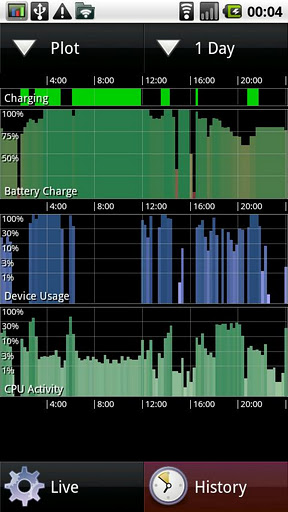
Solve your battery life problem by enabling the background monitoring service to record long-term CPU usage by individual apps.

SystemPanel includes the following features:
Task Manager: The task manager shows what applications are currently loaded into memory and/or running on a device, including current CPU and memory utilization for each. The task manager provides the ability to kill offending applications, and includes an emergency "end all" widget to handle extreme scenarios.

System Monitor: The system monitor can be enabled to record device usage history over a period of time (up to one week), such that you can determine what applications and usage patterns have the greatest impact on battery life. This feature is commonly used to help track down which applications are having major negative effects on battery life. The system monitor records CPU usage for each process, overall CPU usage, display usage, battery level, and battery charging status.

Installer: The installer enables you to install and uninstall applications quickly and conveniently. It can archive multiple versions of applications, such that you can backup your apps before an update and revert back to older versions afterward. This is useful in the not uncommon event the updated item is buggy or otherwise undesirable. Additionally, the Installer is designed to work much more efficiently than the standard Android application manager, and does not suffer the frustrating lag issues found in the default Android item when browsing through a large number of installed apps.

Device Information: The device information screens show detailed information about your Android device, including storage, capabilities, network state, and OS build information.

What's new in this version:
1.1.1: Updates for 320DPI phones. CPU speed meter display fix for HTC phones.
1.1.0: Processes are now categorized into four categories: Active, Service-Only, Cached, and System. See the documentation for more info. Active (currently running) processes are now grouped at the top as a result of this change. Added direct access to Android's process/package control panel, enabling you to directly force stop any misbehaving app (including services).

Download Instructions:
http://www.filesonic.com/file/u0roe8F

Mirror:
http://www.MegaShare.com/3810087
http://www.multiupload.com/JNEPXSK4C7

MultiReader v1.8.2 Apk App


Requirements: Android 1.6+
Overview: eBook speaker. PDF, EPUB, RTF, PPT,... several languages spoken
MultiReader is an eBook Speaker / eReader.

eBook speaker. PDF, EPUB, RTF, PPT,... several languages spoken

MultiReader is an eBook Speaker / eReader.

eBook formats : PDF, EPUB, text, Word, RTF , Power Point.

Voices : english, spanish, french, portugese, dutch, italian, german, Finnish... all TTS engines (Pico, SVox, eSpeak, ...) , all languages

Access to online libraries.

- Very usefull for students for their lessons. To review for an exam.

- Can be used in assimilating information (eLearning), ie. foreign languages, training techniques.

- People who have difficulties with fine print (blind people).

- Simply listen documents from work or news in your car.

Download Instructions:
http://www.MegaShare.com/3809837
http://www.multiupload.com/K4RW7D9DQF

ex Dialer v57 Apk App


Requirements: Android 2.1+
Overview: Best T9 Smart dialer with contacts manager

May be the best smart dialer in android market. ExDialer is a MiUI style smart dialer. If you like it, visit http://www.miui.com to experience excellent MiUI rom. Also you could donate to support my work.
When exDialer installed, two icons will be found in launch panel, exDialer and exContacts. exDialer is the entry of dialer interface with calllog view initiated. exContacts give you a view to browse /filter/manage all known contacts.
Features
*Extra light weight, and smooth
*Contact groups/favorites manager
*T9 contact/calllog filter, which support Latin/Chinese/Russian/Hangul/Greek
*Contacts list quick filter, support words/phonetic/hybrid
*Contacts first alphabet quick scroll
*Calllogs group by contact
Acknowledgments:
Excellent MiUI rom
thinkpanda team
Piotrek Paszek --- Polish translation
dancer_69 --- Greek translation
Kayusumi --- Chinese Traditional translation
Filipe Garcia --- Portuguese translation
hopler --- Spanish translation
Илья Яковлев & Илья и Ася --- Russian translation
TweetyPeety --- German translation
scrpn30 --- French translation
Neo3000x --- Danish translation
crking --- Czech translation

What's in this version:
v57
Fixed problem: SMS not handled by whatsapp
Clear dialed digits after call ended
v56
Fixed incorrect text color in non-touch mode
Improve compatibility with trackball or d-pad
Arabic added, thank machhho
Contacts sort order adjusted

NOTE: Donate version is the same as this version except some texts in about page


Download Instructions:
http://www.filesonic.com/file/ZN6acTR

Droid Virtual Assistant v1.0.16 Apk App


Requirements: Android 2.0+
Overview: Droid Virtual Assistant (DVA) is a simple, fun, and powerful virtual assistant.

You simply speak a command ("Closest gas station", "Browse cnn.com", "New calendar event") and DVA does the rest for you. Built to take advantage of the power of the Android OS. DVA uses powerful Google services like Google Maps & Search to bring you the most up-to-date information.
Want to know what the score of last Monday's football game is? Speak "web search What was last Monday night's football game score" DVA will launch a Google Search to find the information for you.
Great for general web searching as well. Speak "web search How do I tie a tie" DVA launches a Google search for you. Using Google site search; you can search the entire site for the information you are looking for.
Features
* Google weather service support. Speak command "weather", "current weather", "weather in new york"
* Flashlight (Uses camera's flash)
* Calculator
* Start any installed App by speaking App name (Can also configure spoken app name)
* Voice text message sending
* Voice text message notification
* Voice caller id
* Voice dialing
* Voice browsing websites
* Voice calendar access
* Voice enable/disable Bluetooth & WiFi
* Support to start any app you have installed
* Google Image Search
* Google News Search
* Google Recipe Search
* Google Movies
* Google site search to search any Website
* YouTube Video Search
* Clipboard Reader (With pause feature!). Will speak any text you can copy into your clipboard
* Blog Search
* Launch default music player
* much more...
** NOTE **
English support only. Other languages are in the works.
** NOTE **
DVA is always growing. Send us your feedback on what you would like to see added to DVA. We love to hear from you!
Please help us and send any problems or questions you have to support@pocketappbuilders.com Do not worry about your refund period. We take care of our Customers and do everything we can to make them happy!

Download Instructions:
http://www.filesonic.com/file/AQEpvhc
http://www.multiupload.com/M81S0TCTSD

SanDisk Memory Zone (Beta) v1.1.29 Apk App


Requirements: Android 2.2+
Overview: Control, manage and backup your local and cloud memory from one free app.

Take control of your memory: On your phone. On your card. In the cloud.
SanDisk Memory Zone offers you more memory management functionality than any other application available for the Android™ phone.
SanDisk Memory Zone puts you in complete control. Manage and backup both your local and cloud memory with one free app. Move files back and forth from your memory card to select cloud services, or from the cloud directly to your phone.
Improve the performance of your phone in seconds by moving files from your phone’s internal memory to your memory card.
SanDisk Memory Zone not only allows you to transfer and back up your files, it also allows you to secure them through a password protection feature. So you have the peace of mind knowing your videos, photographs, music and other files are not only available, but they’re available only to you.
Get seamless, integrated storage connectivity between your phone, your memory card and your files in the cloud. It’s never been easier to enjoy, manage, share and protect your digital assets.
Unlike utilities with awkward and difficult to navigate folder structures, SanDisk Memory Zone has an intuitive, graphical user interface that lets you get the job done, fast.
Designed by the global leader in flash memory cards, SanDisk Memory Zone allows you to visualize your memory usage by content type and size.
SanDisk Memory Zone. There’s nothing else like it.
Note: Feel free to send feedback to dl-android-apps@sandisk.com rather than a 1 star!

What's in this version:
Version 1.1.29.
Added Facebook support.
Added ability to recommend Memory Zone on your Facebook wall.
Added ability to recommend Memory Zone via an email.

Download Instructions:
http://www.filesonic.com/file/qynLBlf

CloudAround Music Player FULL v1.1.3 Apk App


Requirements: Android 2.2+
Overview: Streaming Music has never been this fun! No one cloud should have all that power
CloudAround enables cloud music streaming from a player from your choice of cloud provider.

Choose from Amazon S3, Rackspace Cloud Files, Dropbox, or all three with as many accounts as you want. No signup is required so download CloudAround and start streaming your music library instantly today. With the CloudAround music player you will have an interface that combines all sources of music in one place. There are more clouds coming soon and many more features in the pipeline. Begin your interactive music journey today!
Features
- No account setup required
- Integrated local storage media with your music from the cloud
- Caching for quicker playback
- Music downloading from the cloud straight to your phone
- Full album cover support
- Automatic song recognition. No searching through filenames!
- Gapless playback
- Seamless integration of multiple clouds in one interface
- Add as many cloud accounts as you would like.
- Full SSL support to protect your secure data
- Same great features as CloudAround Lite, but with NO ADS!
For support, errors, features, or to say hello, just send us an email at feedback@cloudaround.com and we will get back to you soon. We love feedback and want to put our users at the forefront of innovation. We want to be your interactive music player of choice.
Although very similar to Amazon MP3 player, Google Music, Cloudskipper, PowerAMP, and Dropbox, it combines the best of these worlds and lets you access the same data how you want to access it. There is no need to upload all of your music to another provider just so you can stream it. Let CloudAround find, sort, and tag all of your music for you, instantly!
COMING SOON: Soon we will have a slick new interface for our users which will include several UX enhancements to the music player on tablets as well as any music source. The new UX will be driven by the feedback you guys have given us, so please keep it coming. We have much more in store for our users, so keep an eye on our releases!

Download Instructions:
http://www.filesonic.com/file/yLkUmE2
http://www.multiupload.com/912XRY7NST

iLauncher v2.0.10.7 Apk App


Requirements: Android 2.1+
Overview: iPhone style home screen launcher
This is an iPhone style home screen launcher. The launcher makes your phone work just like a real iPhone.

iPhone style home screen launcher
This is an iPhone style home screen launcher. The launcher makes your phone work just like a real iPhone.
- Smooth scrolling.
- Icons have rounded corners and gloss effects.
- Long touch icons to move them around and position them as you like.
- Supports a customizable dock-bar.
- Easily uninstall apps from your home screen.
- Press the back hardware key to exit edit mode.
- Spotlight search

What's in this version:
2.0.10.7
rollback on icon processing
'Exit Launcher' menu disabled for some memory issues

Download Instructions:
http://www.filesonic.com/file/S9wDcO7
http://www.multiupload.com/6H14LTKLNL

Related Posts Plugin for WordPress, Blogger...
Twitter Delicious Facebook Digg Stumbleupon Favorites More

 
Design by Free WordPress Themes | Bloggerized by Lasantha - Premium Blogger Themes | Best Web Host