Advertise

Showing posts with label ANDROID APPS. Show all posts

Monday, December 26, 2011

Floating Image v3.4.7 Apk


Floating Image v3.4.7 Apk | 1.2 MB | Mediafire / MirrorCreator
Requires Android:1.6 and up

AndroidApps.Tk

Images float across your screen from Picasa, Flickr, Facebook and your phone. Animated 3D OpenGL image gallery, Live Wallpaper and Photo Frame. Supports Flickr, Phone, Picasa, 500px and Facebook. Also, multitouch.

v3.4.7 change log:
- 500px added!
- Use all subfolders option added.

Images are flowing by on your screen in a steady stream.

Some people are really happy with it. Give it a shot!

Try pressing "Menu". Lots of exciting stuff behind that button!

Live wallpaper uses battery. If you want it to use less battery, there are a couple of things you can do:
* Disable shadows.
* Use the framerate limiter (it's in the menu somewhere)
* Use local images only.
* Decrease the floating speed.
* Beg me to optimize. It probably won't help, but you will feel like you have contributed!

Download

Skype 2.6.0.95 Apk


Skype 2.6.0.95 Apk | 10 MB | Mediafire / MirrorCreator
Requires Android:2.1 and up

Make free Skype-to-Skype video calls, and call phones at Skype rates on the move
Skype 2.5 for Android lets you make free voice and video Skype-to-Skype calls, and call phones and landlines at great Skype rates on the move.Video calling now supported on more Android phones.

v2.6.0.95 update:
What's new in the hotfix:
Fix for start-up issues on Android 2.1
Fix for occasional white screen
Fix for video orientation on Galaxy Nexus
Other bug fixes
What's new in this version?
• Send pictures, videos and files
• Easier to sign out, and auto-sign in
• Improved look and feel with new graphics
• Voicemail improvements
• Better video quality on Tegra 2 devices

Features:
Free* Skype-to-Skype IM, calls and video calls over 3G or WiFi.
Cheap calls and SMS to landlines or mobiles at great Skype rates

Some notes:
If you're using Android 2.2 (Froyo) or greater on a device not listed in the What's New section, you should still be able to enable video calling in Skype settings. Please note that video call quality may not be as good as on a certified device.

On Android 2.2 (Froyo), only the back camera will work. This is because only devices running Android OS 2.3 or higher allow apps to access the front facing camera.

If the setting to enable video calling is not available in the Skype Settings on your device that means video calling is not yet supported on your phone.

Download

PhotoShake! Pro 1.7.1 Apk


PhotoShake! Pro 1.7.1 Apk | 6.2 MB | Mediafire / MirrorCreator
Requires Android:2.0 and up

AndroidApps.Tk

With PhotoShake, you can easily combine one or more photos to make exciting and fun new images. PhotoShake is a photo editing program that you can use to share photos with family and friends on social networking sites.

V1.7.1 update:
1. Add 24 new stickers.
2. Add folder selection screen in Image Picker
3. Crash bug-fixes

You can easily create a collage photo as follow;
1. Select a theme.
2. Import photos for your collage and select paper type.
3. Simply shake your phone to get random collage images. (click “Edit” for manual select)
4. Also editing tool is available to create special effects on the final collage.

KEY FEATURES:

★ 6 photo theme support (MultiPhoto, SinglePhoto, InstantPhoto, GridPhoto, WidePhoto, WallPaper)
★ Easy photo creation by shake action.
★ High quality frame pinking
★ Various frame patterns
★ Place photo using translation, rotation, and scaling
★ Image filter for photos
★ Storytelling with various balloon item.
★ Funny sticker support.
★ Social media support (Twitter, Facebook, Flicker, Picasa, Blogger, Tumblr)
★ Save & Export.
★ Wallpaper support

PhotoShake allows user to create images from various occasions like everyday life, memorable moments, social gatherings, photo that has a story.
Make a precious memory with family, friends, or others.
Share your beautiful memories and fun episodes with your friends.
Joy and happiness start from your touch.
This app requires Android 2.1+

Download

Download - Market

Jump Desktop (RDP & VNC) v2.6.11 Apk


Jump Desktop (RDP & VNC) v2.6.11 Apk | 1.8 MB | Mediafire / MirrorCreator
Requires Android:2.2 and up

AndroidApps.Tk

ump Desktop is a remote desktop application that lets you control your computer from your phone or tablet. Compatible with both RDP and VNC, Jump Desktop is secure, reliable and very easy to set up.

Features include a streamlined user interface that gives you the best possible remote desktop experience on any of your mobile devices.

Easy setup and reliable:
Jump Desktop is very easy to configure; anyone can do it! Just visit: http://jumpdesktop.com/go on your PC or Mac and follow step-by-step instructions. You’ll be up and running in no time.

Features:
✓ Multi-protocol: supports RDP and VNC
✓ Easy and secure setup: Automatically configure your PC or Mac for remote access using Wi-Fi and 3G without worrying about your router settings. Set up as many computers as you like and manage them all using your Google account (optional)
✓ Universal application: Works on tablets and phones - buy it only once and use it on all your Android devices
✓ Full support for multitasking: Switch to other apps without disconnecting
✓ Supports large custom screen resolution
✓ Full mouse support: left and right clicks, dragging, scrolling, precision pointer movement

RDP features:
✓ Tested on: Windows 2000, XP, Vista, Windows 7, Server 2003, Server 2008, Server 2008 R2, SBS Server
✓ Secure: 40/56/128bit RDP, TLS/SSL, FIPS and NLA authentication support
✓ Supports 8, 16 and 24-bit colors and all RDP performance options
✓ Multiple monitor support on Windows 7 and above
✓ Console sessions

VNC features:
✓ Tested with Mac OS X, TightVNC, RealVNC, UltraVNC, Linux (Ubuntu Remote Desktop)
✓ Secure: Supports SSL encryption when used with Jump's automatic setup instructions: http://jumpdesktop.com/go
✓ 8 and 16-bit color
✓ OS X Screen Sharing support
✓ Multiple monitor support
✓ Supported encodings: copyrect, zrle, tight, (zlib)hextile, zlib, rre, raw, desktop-resize

Download

Download - Market

iLauncher 2.0.10.6 (Full) Apk


iLauncher 2.0.10.6 (Full) Apk | 993 KB | Mediafire / MirrorCreator
Requires Android:2.1 and up

AndroidApps.Tk

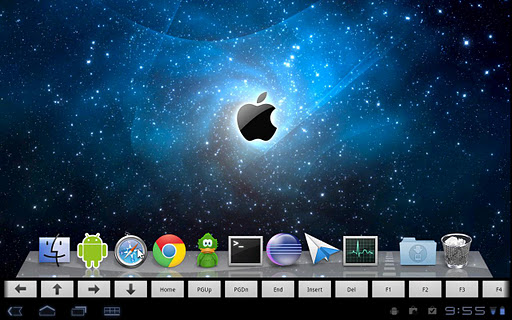
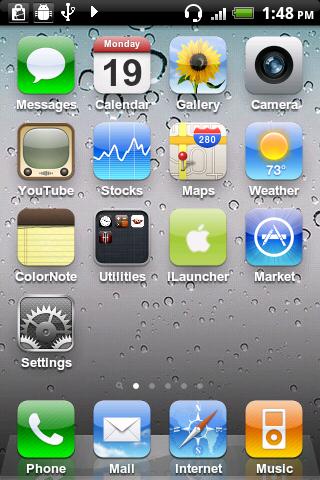
iPhone style home screen launcher. This is an iPhone style home screen launcher. The launcher makes your phone work just like a real iPhone.

v2.0.10.6 update:
- tried to fix crashes. hope it works.
- can change wallpaper
- can exit launcher

** This is NOT a fake screen nor an icon pack. **

- Smooth scrolling.
- Icons have rounded corners and gloss effects.
- Long touch icons to move them around and position them as you like.
- Supports a customizable dock-bar.
- Easily uninstall apps from your home screen.
- Press the back hardware key to exit edit mode.
- Spotlight search

This version aims to replicate the home screen functions provided by iOS 3. Features that are not supported in the current version will eventually be supported in later 1.x versions. Features available on iOS 4 and later are planned to be supported in version 2.0.

Tested with HTC Legends, Galaxy S, Nexus One, HTC Desire.

Download

Download - Market

Pano v1.0.6a Apk


Pano v1.0.6a Apk | 1.2 MB | Mediafire / MirrorCreator
Requires Android:2.1 and up

AndroidApps.Tk

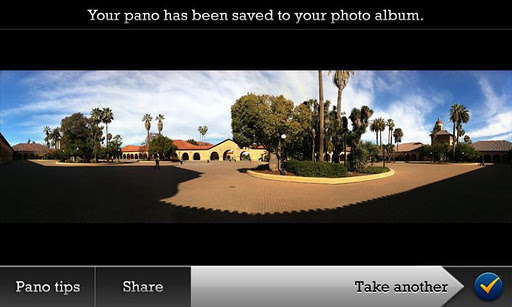
Pano is an award-winning app that lets you take beautiful, seamless panoramic photos straight from your phone, no other software necessary. Pano has gotten rave reviews from hundreds of thousands of users around the world.

Features:
- Deliciously simple interface
- Take 360-degree panoramas with up to *sixteen* photos
- Handy semi-transparent guide helps you line up each shot perfectly
- Advanced alignment, blending, and colour-correction algorithms provide seamless images in just seconds
- Finished panos save directly to your device
- Panos can be resumed if interrupted

Download

Download - Market

Remote Web Desktop Full 5.6.8 Apk


Remote Web Desktop Full 5.6.8 Apk | 2.4 MB | Mediafire / MirrorCreator
Requires Android:1.5 and up

AndroidApps.Tk

Remote manage & control your phone in browser, desktop SMS, webcam, file sync. The best web desktop for Android phones. It provides the easiest way to remotely manage & control your phone through desktop web browser without the USB data cable.

v5.6.8 update:
✔ New web desktop design, thanks Xanders' help.
✔ Fixed auto startup on boot bug.

Including wireless files & folders transfer, desktop SMS, webcam, screen capture, contact manager, cloud clipboard, remote keyboard, wallpaper, APK installer, etc. Totally support all 3G/WiFi/USB connections.

★ Features
─────────────
✔ Desktop SMS: send, read and manage messages from desktop browser. Support long SMS, mass-messages and fake SMS.

✔ File Explorer: manage SD card files and transfer files between phone and computer. Support multiple upload by drag-and-drop (for HTML 5 browser), image viewer, Media Player, etc.

✔ FTP Server: provide a high speed channel to transfer files between phone and computer, enable you to manage sdcard files in Windows File Explorer, browser or FTP client.

✔ Remote Control (Rooted required): remote view and control your android within your computer. Including mouse & keyboard emulation.

✔ WiFi Keyboard: allow you to type on your phone using your computer’s keyboard.

✔ Webcam: turns your phone into a wireless camera, view your camera with web browser (For 2.2+)

✔ Screen Capture: capture phone screen from web (for rooted phone)

✔ Contact Manager (for 2.0+): add/edit/view phone contacts

✔ Shared Clipboard: share clipboard text between PC and phone.

✔ Wallpaper: set phone wallpaper by upload a picture or online picture.

✔ APK Web Installer: backup apps to SD card, and install APK through File Explorer of web desktop.

✔ Personal Web Server: serve your personal web pages on your phone.

✔ SSL HTTP: provide 512 bits RSA encrypt

✔ Network Bridge: support all ineternet connections (2G/3G/WiFi), access your phone at any place.

✔ Many new features are coming soon.

Download

Download - Market

Sunday, December 25, 2011

QQLauncher Pro 2.1.1.296 Apk (HOLIDAY EDITION)


QQLauncher Pro 2.1.1.296 Apk | 4.7 MB | Mediafire / MirrorCreator
Requires Android:2.0 and up

AndroidApps.Tk

A superior Android-based desktop application, QQ Launcher Pro replaces conventional desktops with an enhanced range of frequently used desktop features such as screen and program management. Flashier in the looks department, the solution couples richer functionality with superior performance.

v2.1.1.296 change log:
1. LIVE "Holiday" theme
2. Support "shortcut" in edit mode
3. Some bug fix

[V2.1 HOLIDAY EDITION]
This edition has packed a LIVE "Holiday" theme which can make your phone snowing!
Have Fun!

The launcher supports the following cool features:
1. Built-in widgets such as shortcut switches and task manager;
2. Impressive screen-switching effects (menu > settings > screen);
3. A complete set of program management functions, free sequencing, multidimensional arrangements, and smart searches;
4. Quick access to the Store for users to download applications anytime;
5. Custom folders that classify applications;
6. One-key desktop relocation without losing anything. (Tapping OK after the first installation will guide you through importing default desktop icons.)
7. Provide several sets of personalized skin;
8. Cool Lock Screen.

Download

FriendCaster Pro for Facebook 4.2.0.1 Apk


FriendCaster Pro for Facebook 4.2.0.1 Apk | 3.6 MB | Mediafire / MirrorCreator
Requires Android:1.6 and up

AndroidApps.Tk

FriendCaster Pro - the best Facebook experience on Android devices, with no ads! FriendCaster Pro for Facebook - No Ads, More Features gives you the best Facebook experience on Android devices!

v4.2.0.1 update:
- Fix Photo Uploads Orientation

Advantages of FriendCaster over the standard Facebook for Android app:

General
★ More Secure with Enforced SSL Encryption
★ New ActionBar UI
★ Pull To Refresh
Notifications
★ Gmail/K-9 Push Notifications. FriendCaster can check for emails that Facebook sends to you telling you that you’ve got a notification.
★ Notifies on Facebook Messages, Friends’ Birthdays & Notifications
★ Notification Popup (which can show over Lock-screen and has Quick Reply). Similar to SMS Popup, Handcent SMS, etc.
Postings
★ Share Links from the Browser easily without being redirected to Mobile Web
★ Ability to select the privacy setting for each Facebook Status/Post you make
★ Ability to Like comments and see how many likes comments have
★ Re-Share your Facebook Friend’s Posts
Friends
★ Add Facebook Friends as Favorites for easy access
★ Ability to Add/Remove Facebook Friends
Photos
★ Upload multiple photos (with Gallery)
★ View the Photos that your Friend’s are tagged in on Facebook
★ View and Tag Friends in Photos on Facebook
★ Upload Photos to Groups and Pages (that you own) on Facebook
Videos
★ Upload Video to Facebook
★ Upload multiple videos with the Gallery App

Other notable features:
- Excellent Widget
- Checkin & Places
- View your Events and Groups
- View Friends, their profiles, photos and albums
- Upload High Resolution Photos
- RSVP to Events, see who’s attending and where it is
- In-built Inbox Messages view
- Vibrate, LED and Sound options

We're adding new features all of the time, so check back often!

Planned Features Include:
- Tablet layouts
- Chat
- Themes
- Contact Syncing

Download

Download - Market

ProCapture v1.24 Full Apk


ProCapture v1.24 Full Apk | 6.1 MB | Mediafire / MirrorCreator
REQUIRES ANDROID:2.2 and up

AndroidApps.Tk

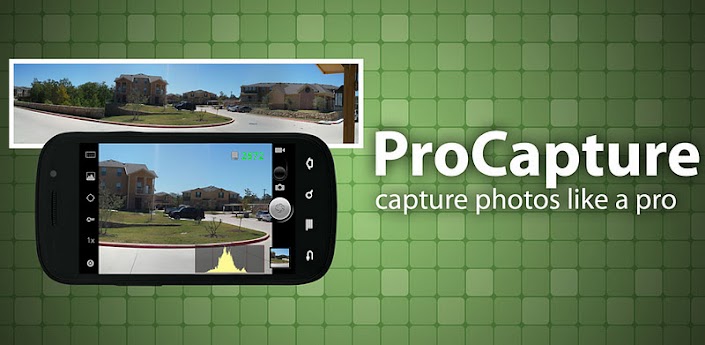
Capture photos like a pro with ProCapture. ProCapture adds advanced features to the Android camera experience. Multiple advanced shooting modes supported: Timer, Burst, Reduced Noise, WideShot and Panorama.

Please note that this app is not for video capture.
- Panorama mode automatically links together up to 12 photos to produce a high resolution panoramic image providing the ability to zoom in on small details. Output panorama has the highest resolution and best quality among competitors (depends on phone memory).
- WideShot mode automatically links together 3 photos to produce a high resolution wide image.
- Reduced Noise mode captures 2 photos and combines them in order to reduce noise in the photo by about 30%.
- Shoot better photos with 2 different on-screen composition aids: grid and Fibonacci spiral.
- Real-time on-screen histogram helps you get better exposed photos.
- Simple UI with easy access to all features.
- On-screen remaining photos indicator.
- Ability to configure volume buttons for zoom or photo capture.
- Save to internal or external storage (please email us if external storage is not supported on your phone).

Download

Download - Market

GO SMS Pro 4.11 Apk


GO SMS Pro 4.11 Apk | 4.7 MB | Mediafire / MirrorCreator
Requires Android:1.6 and up

AndroidApps.Tk

GO SMS PRO brings you cool UI, fast and convenient SMS/MMS experience. GO SMS Pro(yet FREE) is the most popular messaging app, huge enhancement for stock SMS, much faster, more functions, tons of settings, support SMS/MMS/GO Share/GO Chat/Facebook Chat, Include ALL you want for texting. MUST HAVE.

v4.11 update:
1.Release web version GO SMS theme maker: gosmstheme.goforandroid.com
2.Optimize code, improve performance
3.Optimize speed of Greeting Card and Online SMS
4.Optimize speed of SMS restore and batch deletion
5.Optimize GO Chat
6.Add funny blessing feature, send message that contain "Merry Christmas", "happy new year" to your friends, both conversation view will snow, just enjoy and spread it
7.Fix MMS saved as draft after sent
8.Fix some bugs in Private box, Contacts

★ Features
-- Full SMS/MMS support
-- GO Share service, send file through 2G/3G/4G or WIFI or by one SMS
-- GO Chat/Facebook Chat support
-- Doodle, Handwriting
-- Private box
-- Schedule SMS
-- Batch modes
-- Popup with quick reply, privacy mode
-- SMS backup and restore by all or by conversations, can be sent to email
-- Many cool themes; also DIY theme, Theme Maker plug-in;
-- Fully customizable look; Supports chat or list style; Font changeable
-- Security lock, support lock by thread; Blacklist
-- Support GESTURE, left/right slip, many transition effect
-- Support Emoji with Emoji pulg-in
-- Settings backup and restore
-- Facebook contact photo support
-- Group texting
-- Notification with privacy mode and reminder notification
-- Support folders view: Inbox, Outbox, MMS, created folders, encrypt folders
-- Individual customization for Notification , Signature and Conversation
-- 1x1 icon widget with message count and 4x2 medium widget
-- Support many languages
-- Online SMS lib
-- Handy, build-in Contacts
-- Night mode
-- Stock SMS can be removed (but please be care)
-- Split large messages for CDMA
-- Time offset adjustment
-- Avoid disordered messages: sort by time or by order of msg sent/received
-- Localization support for accented chars: by enabling Czech, Polish and French SMS mode
-- Quick text management
-- Messages grouping (Group mode or Separate mode)

Download

Camera360 Ultimate v2.7.0 Apk


Camera360 Ultimate v2.7.0 Apk | 3.8 MB | Mediafire / MirrorCreator
Requires Android:1.5 and up

AndroidApps.Tk

The most famous and perfect camera app helps your photo more amazing, funny and interesting.

* Effect like LOMO, Retro Effect, Dreamlike Effect, Art of Black and White, Back to 1839 and Night Enhancement will make your photo more beautiful.
* The amazing HDR effect is even better than iPhone HDR.
* Unique Funny Mode: Effects like Surrealistic B&W Paining, Vertical/Horizontal Left Symmetry, Vertical/ Horizontal Right Symmetry, Ghost are available.
* Unique Scenery Mode: It takes the interesting composite photos, you can choose whether be in a movie poster, an art painting, a outdoor advertisement, or among the various types of greeting cards.
* Unique Tilt-shift and Color-shift Mode allows you to see the world from another angle.
* Share your photo to Sina Microblog, Facebook or Twitter

Download

MyBackup Pro v3.0.6 Apk


MyBackup Pro v3.0.6 Apk | 1.5 MB | Mediafire / MirrorCreator
Requires Android:1.5 and up

AndroidApps.Tk

MyBackup Pro is the easiest backup for Android. Supporting the most content, and the most Android devices.

Backup (with schedule option) to our online secure servers, or SD card, your Applications, Photos, Contacts, Call log, Browser Bookmarks, SMS (text messages), MMS (message attachments), Calendar, System Settings, Home Screens (including shortcut positions), Alarms, Dictionary, Music Playlists, and more...

IN BETA: Trigger a backup to begin on your phone (Android 2.2+ only) from anywhere in the world by logging into the Web Viewer from our website www.rerware.com

Restore your backups on your existing or new phone.

View your data and application backups online, by logging into the Web Viewer at www.RerWare.com

MyBackup Pro will work on all Android mobile devices, regardless if they have root access or not.
Users who have a rooted phone: You can backup apk+data as well as market links!

NOTE: Data/setting of applications can only be supported if you have a rooted phone, or if the application integrates with us.

__ ROOT ONLY PHONE FEATURES BELOW __
MyBackup Pro now comes with all MyToolbox features for Free.
This application will allow Root users to multi-select applications and perform the following functions with 0-click batch operations!

- Freeze bloatware, system apps
- UnFreeze frozen applications
- Wipe Cache of applications
- Wipe Data of applications
- Uninstall applications
- Break the Android Market Link to Apps
- Link Apps to the Android Market
- Force Close applications

Download

Download - Market

Folder Organizer v3.4.4.10 full Apk


Folder Organizer v3.4.4.10 full Apk | 1.9 MB | Mediafire / MirrorCreator
Requires Android:1.6 and up

AndroidApps.Tk

Group items according to labels and create fully customizable folders and widgets. You can organize apps, bookmarks, contacts and shortcuts

v3.4.4.10 update:
- Bug fixing on Ice Cream Sandwich

+ Change folder icon, icon pack support
+ Sort folder items any way you like
+ Make app shortcuts with custom icons and names
+ IconFinder support: search for new icons on the web
+ Put items in notification bar
+ Scrollable widgets

Tutorials are available in official site www.folderorganizer.net

Permissions are needed to read contacts and bookmarks, create direct call shortcuts and download new icons.

Folder Organizer can't be moved to sd card because it contains widgets (see Android documentation for details).

Please restart your home replacement or your device if you see wrong icons on home after a version update

Download

Download - Market

RAM Manager Pro v2.0.1 Apk


RAM Manager Pro v2.0.1 Apk | 124 KB | Mediafire / MirrorCreator
Requires Android:2.1 and up

AndroidApps.Tk

This application was made for making RAM of all android phone to the best optimization.This application improves perfomance of your phone in all directions. Switching between applications is very fast, your system will be smoothness as never before. You can fully use your multitasking and you still have as much memory as you need.

v2.0.1 update:
Improved option "Non-killable launcher", improved option "Hard Gaming"

FEATURES:
-Balance - Option which makes your RAM to the best optimization, this option is for everyday using when you use your phone for the most functions and you want have fast phone without lags.

-Balance (with more free memory) - This option is on the same base as balance, but this option should be advantageous for users who have less RAM than 512 MB. This option makes your RAM to the best optimization with more free memory but with a bit less multitasking.

-Balance (with more multitasking) - This option is on the same base as balance, but this option should be advantageous for users who have more RAM than 512 MB. This option gives you more multitasking.

-Hard Gaming - Option which stabilizes your RAM for playing the hardest games. Use this option for games which lags on your phone. Your games will be smoothness and without lags.

-Hard Multitasking - Option for users which are really hard working on their phones. You can have a lot of running apps with fast switching between them and without lags.

-Default (Samsung) - Default settings by Samsung, this settings also use phones as LG, HTC, etc.

-Default (Nexus S) - Default settings which use all Google phone.

-Default settings of your phone - This option reverts your RAM to your default settings, which you had before you install this app.

-All Balance options include additional option "Non-killable launcher".

-Chosen option is automatically set on each reboot.

-You can easily switch between all options without rebooting.

Download

Download - Market

Document Scanner 2.8 Full Apk


Document Scanner 2.8 Full Apk | 2.3 MB | Mediafire / MirrorCreator
Requires Android:1.5 and up

Scan docs with your phone camera,convert to PDF. Email/upload to GDocs/Dropbox/Evernote to share/store.

v2.8 update:
- Significantly improved black/white conversion

Scan documents and receipts with your phone camera, convert them to PDF. It is a portable scanner for your Droid.
*email PDF or upload it to DROPBOX(Donut+), Google Docs, EVERNOTE (Eclair+), BOX.net (Froyo+)
*OCR Option through GDocs/Evernote
*create folders
*no page limit
*scan and add pages later to an existing folder
*insert existing gallery image
*compression and page size options
*reorder pages
*quick one-page option to take a picture and upload as PDF with a single click
*Correct perspective and crop your captured image. The app detects the four corners automatically and gives you an opportunity to modify it
*Enhance image and convert to gray scale (or black/white) as desired

Download

Download - Market

3G Watchdog Pro 1.8.0 Apk


3G Watchdog Pro 1.8.0 Apk | 529 KB | Mediafire / MirrorCreator
Requires Android:1.5 and up

AndroidApps.Tk

3G Watchdog Pro Guarding you against costly internet overages. Pro version of 3G Watchdog mobile data counter / monitoring app, featuring:

* Advanced data usage prediction
* Billing rules (counts in blocks, ignores uploads)
* Usage history with graph & CSV export
* Usage by application (Android 2.2+, unavailable on Dell Streak)
* 5 widget styles
* Backup/restore
* Redesigned UI
* Account/SIM with auto switch (requires a phone with a SIM)
* Import settings & data from 3GW free (don't uninstall 3GW free before importing!)
* ... and more!

v1.8.0 update:
- Built-in mobile network disabler (Android 2.3+ only):
- requires new permission to change the state of network connectivity.
- APNdroid or JuiceDefender are no longer required for Auto-disable function (but you can use them if you want).
- Option to increase 3GW service priority and improve accuracy. Disabled by default, enable it in Settings > Advanced.
- Turkish language (89% complete). Russian soon!
- Bug fixes
- The Lookout button directly opens Lookout if the app is installed.


Download

Download - Market

iLauncher 2.0.10.5 Apk


iLauncher 2.0.10.5 Apk | 993 KB | Mediafire / MirrorCreator
Requires Android:2.1 and up

AndroidApps.Tk

iPhone style home screen launcher. This is an iPhone style home screen launcher. The launcher makes your phone work just like a real iPhone.

v2.0.10.5 update:
- Improved performance and layouts on high resolution device
- Icon backup is now supported, but i made it roughly so use it with care. Avoid using it when usb connected, downloading an app, updating apps.

** This is NOT a fake screen nor an icon pack. **

- Smooth scrolling.
- Icons have rounded corners and gloss effects.
- Long touch icons to move them around and position them as you like.
- Supports a customizable dock-bar.
- Easily uninstall apps from your home screen.
- Press the back hardware key to exit edit mode.
- Spotlight search

This version aims to replicate the home screen functions provided by iOS 3. Features that are not supported in the current version will eventually be supported in later 1.x versions. Features available on iOS 4 and later are planned to be supported in version 2.0.

Tested with HTC Legends, Galaxy S, Nexus One, HTC Desire.

Download

Download - Market

Saturday, December 24, 2011

PlayerPro Music Player 2.2 Apk


PlayerPro Music Player 2.2 Apk | 3.6 MB | Mediafire / MirrorCreator
Requires Android:2.0 and up

PlayerPro: skins, artist/album information and art, grid/list views, lyrics.
PlayerPro Music Player is an advanced music and video player for Android 2.x devices.

v2.2 update :
- Customizable/skinnable home screen widgets: option to select skin, option to display artist pictures instead of album artwork, display ratings, display shuffle/repeat, select button color ...
- Other enhancements: bigger artwork, bigger buttons (3x3 widget), bug fixes
- Skinnable lockscreen widgets + added options to hide ratings/shuffle/repeat buttons
- Added custom equalizer screens to Sense, Sense for Her, Pure White, Mystic Blue skins
- ICS support
- Various bug fixes and UI tweaks

Key features:
* Browse and play your music by albums, artists, genres, songs, playlists, folders, and album artists.
* Video browser and player.
* Automatically downloads missing album artwork, artist pictures and genre illustrations.
* Manually pick your preferred album artwork, artist pictures, genre illustrations from the Internet, the Gallery app, ID3 tags, or album folder.
* Change the user interface of the Player by installing one of the 14 available SKINS, all for free.
* Customize the layout, chosing between GRID or LIST views.
* Read album and artist REVIEWS.
* Download, search and and save LYRICS to your music files using standard ID3 tags.
* Single and group TAG EDITING: title, album, artist, track, year, genre, comment. Formats supported: mp3, ogg, flac, wma, wav, m4a, mp4.
* Mixable AUDIO EFFECTS for Android >2.3 devices: 5 band graphic EQUALIZER with default/customizable presets (edit, rename, delete), STEREO WIDENING effect (virtualizer), REVERB effects (large hall, medium hall, plate, small room, medium room, large room), BASS BOOST effect, volume control.
* Free additional DSP PLUGIN for Android <=2.2 or >=2.3 devices: 10 band graphic EQUALIZER with 15 default/customizable presets, PRE-AMP control, BASS BOOST control, volume control. Go to Settings > Audio and select "Download DSP pack" option to install the free plugin.
* Dolby and SRS sound effects for HTC devices equipped with HTC sound enhancement (HTC desire HD, etc).
* Music stats and SMART PLAYLISTs: RATINGs, play/skip counts, last played, last added.
* Import and export music history and ratings from your favorite desktop music

player: Songbird, Winamp, Wmp, MediaMonkey, Music files.
* Music folder selection.
* Choice of 2 LOCK SCREEN widgets with many customization options: unlock slider, sound toggler, skip tracks using volume buttons, swipe gestures ...
* Choice of 5 different home screen WIDGETs (4x1, 2x2, 3x3, 4x4, 4x2).
* Supported SCROBBLERs: Simple Last.fm, Scrobble Droid, Official Last.fm app.
* SLEEP TIMER with fade out.
* SHARE text notifications, album/artist artwork on your favorite social networks: Twitter, Facebook, Gmail, Picassa etc.
* HEADSET support. Customize long press and double/triple press actions.
* Library wide SEARCH. VOICE search support.
* SWIPE gestures (player: swipe album art to skip songs, browsers: swipe left to play next, swipe right to play last).
* SHAKE IT feature: give your phone a shake to play next/previous song (e.g.: shake top to bottom or bottom to top to play next/previous song).

Download

Download - Market

TTPOD music player 2.9.1 Final Apk


TTPOD music player 2.9.1 Final Apk | 4.1 | Mediafire / MirrorCreator
Requires Android:1.6 and up

AndroidApps.Tk

One of the most successful and popular music players for Android. TTPod is one of the most successful and popular music players for Android with more than 10 million downloads worldwide.

What’s the TTPod powerful features:
- High quality decoding with mp3,mp4/m4a,wma,flac and ape;
- Built in graphic and customize EQ;
- High accurate lyrics and album acts downloads;
- Plenty of skins to chose from;
- Minilyrics style floating lyrics.

Download

Related Posts Plugin for WordPress, Blogger...
Twitter Delicious Facebook Digg Stumbleupon Favorites More

 
Design by Free WordPress Themes | Bloggerized by Lasantha - Premium Blogger Themes | Best Web Host