Advertise

Showing posts with label Android 2.3 and Up. Show all posts

Thursday, December 15, 2011

DSLR Controller (BETA) 0.80 Apk


DSLR Controller (BETA) 0.80 Apk | 302 KB | Mediafire / MirrorCreator
Requires Android:2.3 and up

AndroidApps.Tk

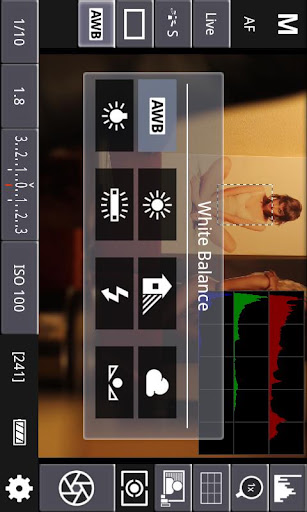
Full control of your Canon EOS DSLR from your phone or tablet through USB ! DSLR Controller is the first and only app that allows you to fully control your Canon EOS DSLR from your Android device with only a USB cable. No computer or laptop required, no root required, only a compatible mobile device, a compatible camera, and the right USB cable.

v0.80 update:
- Added fullscreen liveview option
- Added keyguard dismiss/disable
- Added dedicated image review button
- Added basic Mirror Lockup support (2000ms auto-release)
- Fixed image freeze (internal thread deadlock)
- Fixed crash when saved HDR settings do not match camera model
- Fixed infinite permission loop
- Fixed standard theme per Android API level
- Fixed AF/MF button wrong state
- Fixed R-MF controls visible in MF mode
- Fixed video button display
- Fixed timing issues (1DmkIV)

*** PLEASE READ THE ENTIRE DESCRIPTION ***
NOTICE: This is a BETA / PRE-RELEASE version. The product is not finished yet and there will still be issues. Due to massive demand and a great many requests to release, it is being released early. The price will go up once v1.0 is reached, but the upgrade is free for those who have this BETA.

We strongly suggest you read up on the website ( http://dslrcontroller.com/ ) about what DSLR Controller can do, how it works, and how to use it, before purchasing. The website contains a wealth of information you should know before using. Be sure to read the FAQ!

If you need a refund, go to our website ( http://dslrcontroller.com/ ). We cannot process refunds through email.

Most questions should go to the support and discussion thread at XDA-Developers.com:
http://forum.xda-developers.com/showthread.php?t=1202082

*** DSLR Controller is NOT compatible with all devices! For a free app you can use to test compatibility, see the "Remote Release" app ( http://market.android.com/details?id=eu.chainfire.remoterelease ) ***

----- Features -----

Features include but are not limited to:

- Live View
- Auto Focus (tap Live View)
- Manual focus adjustments in Auto Focus mode
- Histogram
- Zoom control
- Grid and aspect ratio display
- Bulb capture
- Continuous capture
- Image review (+ follow shot)
- Image filters (peaking, contrast, channel mask, grayscale, 4 different modes per filter)
- Video recording (basic)
- HDR capture
- Extensive modification of settings
--- Shutter speed
--- Aperture
--- Exposure Compensation and Bracket
--- Flash Compensation
--- ISO speed
--- Auto-Focus Mode
--- Focus and Zoom area (tap-and-hold Live View)
--- Picture Style
--- Drive Mode
--- White Balance
--- Color Temperature
--- Auto-Lighting Optimizer
--- Metering Mode

Available options depend on the mode you have your camera set to (M, Av, Tv, etc) and camera model. Refer to the website ( http://dslrcontroller.com/ ) for further details.

Download

Download - Market

Tuesday, December 13, 2011

Sprinkle 1.7 Apk


Sprinkle 1.7 Apk All Device | 25 MB | ManyLinks
Requires Android:2.3 and up

AndroidApps.Tk

Ready, Aim, Squirt! Using a water cannon mounted on a crane, players must adjust the height and angle of the cannon to fight fires, move obstacles, spin wheels and activate traps in this challenging water-physics based puzzler! But squirt carefully as you will run out of water and the less water you use, the more drops you earn!

v1.7 update:
- Winter world with twelve new levels!
- Support for Xperia Play controls

Sprinkle is available for devices running Android 2.3 or greater!

Using some of the most realistic water physics seen on an Android device yet, Sprinkle is a brain-teasing game that will have players straining to figure out each puzzle and obstacle.

Sprinkle features:

Amazing water physics – Some of the most realistic water physics ever seen on an Android device make Sprinkle an exciting and addictive puzzler.

Brain-teasing puzzles – What starts as simply pointing and spraying to quench each fire becomes much more challenging, as players must overcome the intricacies of each puzzle before time and water run out.

Blocks, boulders, and cogs oh my – Use the power of your water cannon to move blocks of ice and boulders, spin giant cogs, and depress traps inorder to reach and extinguish every last fire.
The inhabitants of Titan, a moon of Saturn, lived out their days peacefully in their straw hut homes – until space tourists from Earth crashed through Saturn’s rings, bringing a storm of flaming asteroids crashing down on the Titans. To combat the widespread fires threatening their homes, the Titans have built a massive water cannon. And they need you to man it!

Xperia PLAY Optimized!

Download Or Download

Download - Market

Thursday, November 24, 2011

Equalizer (Unlocked) 3.0.1 Apk

Equalizer-apk
Equalizer (Unlocked) 3.0.1 Apk | 1.1 MB | Mediafire Download
Requires Android:2.3 and up

AndroidApps.Tk

Equalizer app and widget to control your sound effect levels on your phone. Improve your phone/tablet’s sound quality with the first true Equalizer app and home-screen widget!

v 3.0.1 update:
- Force close fix on some devices
- New feature to add stock preset shortcuts to your home-screen
- Also Add preset shortcuts directly from home screen
- 3.0.0 is packed with improvements:
- New redesigned "ICS" inspired User Interface.
- New vertical Equalizer sliders!
- Improved app navigation through tabs or screen swiping.
- Now supports Android 4.0 "ICS" phone and tablet.

Equalizer lets you adjust sound effect levels so that you get the best out of your Music or Audio coming out of your phone. Apply Equalizer Presets based on Music Genre, or quickly create your own custom preset with the 5 band Equalizer controller. Additional Audio Effects supported include: Bass Booster, Virtualizer and Reverb Presets.

* Requires Android 2.3 Gingerbread. Custom ROMs may not work due to issues with the ROM. Keep in mind custom gingerbread ROMs are infant, and give the ROM developers some time to integrate in the new APIs. If your ROM works please post so that others know. If you have issues, please contact us and let us know what ROM you are using.

Features:

★ 11 Stock Presets
★ Preset auto-detection (See list of supported players below)
★ 5 Band-level Equalizer Controller
★ Audio sampler to test your Equalizer settings
★ Bass Booster
★ Virtualizer
★ Reverb Presets
★ Integrates with stock Android Music player
★ Works with streaming music like Pandora, Spotify, etc.
★ Power Mode options to enable/disable effects
★ Beautiful 4×1 and 2×1 Equalizer widgets for your home-screen
★ Notification shortcut available for quick access
★ Fully optimized for Tablets and Google TV
★ No root required

Full features include: (Requires purchasing Unlock key)

★ Save Custom Presets
★ Delete, Edit, Rename Presets
★ Create Home-screen shortcut for Presets
★ Backup and Restore Presets from SD card

Stock presets include:
★ Normal
★ Classical
★ Dance
★ Flat
★ Folk
★ Heavy Metal
★ Hip Hop
★ Jazz
★ Pop
★ Rock
★ Latin (New)

The preset auto-detection feature does not work with all third-party music players; however, we will keep adding support to new players based on popular demand. The list of known supported Music players includes:

* Android Music Player
* Winamp
* UberMusic
* PlayerPro
* RealPlayer
* myTouch 4G Music Player
* Meridian Player
* RockOn
* doubleTwist Player
* WIMP
* MIUI Music Player
* ³ (cubed)
* PowerAMP
* Zimly
* bTunes
* Vanilla Music Player
* Rhapsody Player
* MixZing
* Just Playlists
* Archos Music Player
* More to come…

Note: Please make sure to read the “Helpful tips” when you first install the application.

Download Or Download

Download - Market

Sunday, November 13, 2011

DroidVox - Voice Changer 1.0.3 Full


DroidVox - Voice Changer 1.0.3 Full | 2.9 MB | Mediafire Download
Requires Android:2.3 and up

AndroidApps.Tk

DroidVox - Talk like an Android! Transform your voice with DroidVox and let your voice sound like famous robots! DroidVox is a voice recorder and voice changing app for Android phones using vocoder technology.

v1.0.3 update:
- OpenSL disabled for Samsung GALAXY S II per default
- Xoom multitouch crash fixed
- Layout bug for tablets fixed
- Bugfix for crashes on CPUs with no Neon support (Tegra 2)
- Performance optimizations

Use the live mode or record your voice with your phone's built-in microphone to sound like a robot. Choose among 8 different voice models and modify each effect using the X-Y control field for changing pitch and modulation in real-time.

Hear your voice transformed in real-time with headphones or through the phone speaker. Or simply record your voice and play back your altered voice instantly.

Save your recording as a ringtone and send it via email or share it directly on facebook* or SoundCloud.

Get it now and become an Android instantly!


DroidVox Features:
- 8 voice models: Pitch Shift, Cylon, Dalek, Singing Robot, Vader, HAL, Stephen, Prophet
- X-Y control field for modifying pitch and modulation
- 3 different modes: real-time, parrot and recording
- Real-time mode (with headphones)
- Voice recording
- Save and email your creations as WAV files
- Share your results directly on facebook* or SoundCloud
- Save your transformed voice as ringtone
- Pitch shifter
- Vocoder with real-time FFT spectral analysis

* This is a beta feature and is subject to change without notice. Please note that your messages on facebook are hosted publicly on soundcloud.com. Please note also that your direct facebook uploads might be deleted after a certain time.

Download Or Download

Download - Market

Tuesday, November 8, 2011

Equalizer (Unlocked) 2.30 Apk

Equalizer-apk
Equalizer (Unlocked) 2.30 Apk | 1.1 MB | Mediafire Download
Requires Android:2.3 and up

AndroidApps.Tk

Equalizer app and widget to control your sound effect levels on your phone. Improve your phone/tablet’s sound quality with the first true Equalizer app and home-screen widget!

v2.3.0
- Force close bug on some devices

Equalizer lets you adjust sound effect levels so that you get the best out of your Music or Audio coming out of your phone. Apply Equalizer Presets based on Music Genre, or quickly create your own custom preset with the 5 band Equalizer controller. Additional Audio Effects supported include: Bass Booster, Virtualizer and Reverb Presets.

* Requires Android 2.3 Gingerbread. Custom ROMs may not work due to issues with the ROM. Keep in mind custom gingerbread ROMs are infant, and give the ROM developers some time to integrate in the new APIs. If your ROM works please post so that others know. If you have issues, please contact us and let us know what ROM you are using.

Features:

★ 11 Stock Presets
★ Preset auto-detection (See list of supported players below)
★ 5 Band-level Equalizer Controller
★ Audio sampler to test your Equalizer settings
★ Bass Booster
★ Virtualizer
★ Reverb Presets
★ Integrates with stock Android Music player
★ Works with streaming music like Pandora, Spotify, etc.
★ Power Mode options to enable/disable effects
★ Beautiful 4×1 and 2×1 Equalizer widgets for your home-screen
★ Notification shortcut available for quick access
★ Fully optimized for Tablets and Google TV
★ No root required

Full features include: (Requires purchasing Unlock key)

★ Save Custom Presets
★ Delete, Edit, Rename Presets
★ Create Home-screen shortcut for Presets
★ Backup and Restore Presets from SD card

Stock presets include:
★ Normal
★ Classical
★ Dance
★ Flat
★ Folk
★ Heavy Metal
★ Hip Hop
★ Jazz
★ Pop
★ Rock
★ Latin (New)

The preset auto-detection feature does not work with all third-party music players; however, we will keep adding support to new players based on popular demand. The list of known supported Music players includes:

* Android Music Player
* Winamp
* UberMusic
* PlayerPro
* RealPlayer
* myTouch 4G Music Player
* Meridian Player
* RockOn
* doubleTwist Player
* WIMP
* MIUI Music Player
* ³ (cubed)
* PowerAMP
* Zimly
* bTunes
* Vanilla Music Player
* Rhapsody Player
* MixZing
* Just Playlists
* Archos Music Player
* More to come…

Note: Please make sure to read the “Helpful tips” when you first install the application.

Download Or Download

Download - Market

Sunday, November 6, 2011

Equalizer (Unlocked) 2.2.9 Apk

Equalizer-apk
Equalizer (Unlocked) 2.2.9 Apk | 1.1 MB | Mediafire Download
Requires Android:2.3 and up

AndroidApps.Tk

Equalizer app and widget to control your sound effect levels on your phone. Improve your phone/tablet’s sound quality with the first true Equalizer app and home-screen widget!

v2.2.9
- Fixed music picker for test audio file
- Fixed Android 4.0 bug with Action Bar (Menu bar at the top)
- Force close bug on some devices

Equalizer lets you adjust sound effect levels so that you get the best out of your Music or Audio coming out of your phone. Apply Equalizer Presets based on Music Genre, or quickly create your own custom preset with the 5 band Equalizer controller. Additional Audio Effects supported include: Bass Booster, Virtualizer and Reverb Presets.

* Requires Android 2.3 Gingerbread. Custom ROMs may not work due to issues with the ROM. Keep in mind custom gingerbread ROMs are infant, and give the ROM developers some time to integrate in the new APIs. If your ROM works please post so that others know. If you have issues, please contact us and let us know what ROM you are using.

Features:

★ 11 Stock Presets
★ Preset auto-detection (See list of supported players below)
★ 5 Band-level Equalizer Controller
★ Audio sampler to test your Equalizer settings
★ Bass Booster
★ Virtualizer
★ Reverb Presets
★ Integrates with stock Android Music player
★ Works with streaming music like Pandora, Spotify, etc.
★ Power Mode options to enable/disable effects
★ Beautiful 4×1 and 2×1 Equalizer widgets for your home-screen
★ Notification shortcut available for quick access
★ Fully optimized for Tablets and Google TV
★ No root required

Full features include: (Requires purchasing Unlock key)

★ Save Custom Presets
★ Delete, Edit, Rename Presets
★ Create Home-screen shortcut for Presets
★ Backup and Restore Presets from SD card

Stock presets include:
★ Normal
★ Classical
★ Dance
★ Flat
★ Folk
★ Heavy Metal
★ Hip Hop
★ Jazz
★ Pop
★ Rock
★ Latin (New)

The preset auto-detection feature does not work with all third-party music players; however, we will keep adding support to new players based on popular demand. The list of known supported Music players includes:

* Android Music Player
* Winamp
* UberMusic
* PlayerPro
* RealPlayer
* myTouch 4G Music Player
* Meridian Player
* RockOn
* doubleTwist Player
* WIMP
* MIUI Music Player
* ³ (cubed)
* PowerAMP
* Zimly
* bTunes
* Vanilla Music Player
* Rhapsody Player
* MixZing
* Just Playlists
* Archos Music Player
* More to come…

Note: Please make sure to read the “Helpful tips” when you first install the application.

Download

Download - Market

Sunday, October 30, 2011

MattedBlues - CM7 Theme Engine v1.9 Apk


MattedBlues - CM7 Theme Engine v1.9 Apk | 8.5 MB | Mediafire Download
Requires Android:2.3 and up

AndroidApps.Tk

MattedBlues for T-Mobile Theme Engine (CM7+)
We are very proud to announce, and finally release, MattedBlues for CM7 Theme Engine. MattedBlues is a theme for the T-Mobile Theme Engine, which is built into CyanogenMod 7. It was originally created for the Evo and then ported to a number of devices. Now it is available to all devices running CM7 with Theme Engine!

INSTRUCTIONS:
1. Install
2. Apply in Theme Chooser
3. Reboot
4. Marvel at how amazing your phone looks and provide us with feedback!

v1.9 update:
- SIGNING ISSUE FIXED THANKS TO BEATBLASTER!!
- Lots of Changes:
- Reworked and refined WiFi bars
- Reworked battery and data icons from scratch
- Tweaked status bar icons
- NEW music animation (usually starts when you receive another notification) VIDEO: http://goo.gl/8cnWJ
- New themed pop-ups, progress bars, seek thumb sliders
- New contact pictures and contact badge
- Tweaked title bars
- Themed app icons: MOG, APW, Desktop Vis, Trulia, Astro, WidgetLocker & MORE!
- Themed Nav notification icons

IMPORTANT NOTES:
-Compatible with all HDPI devices running CyanogenMod 7 with T-Mobile's Theme Engine.
-When applying, you may see a message about "missing assets for device's screen size" but it will apply fine on any and all HDPI devices.
-Please email us if you have any issues (although you shouldn't).
-Check out MattedBlues Super Clock skins in Beautiful Widgets app (see screenshot).

**Updates coming soon. We will add MattedBlues wallpapers, docks, and icons to our threads on XDA shortly. Check them out here: http://bit.ly/a9Vda6 and http://bit.ly/je6FEL.

Major thanks to BeatBlaster_, a major contributing member of Team MattedBlues. Additionally, thank you to the following users for contributing to and helping with MattedBlues: SHlFT, sonnysekhon, ChrisSoyars, MrDSL, manup456, troyhatton, bob, ar15fonsi, jaguirre1231, klinster. Thank you all!

Download

Download - Market

Friday, October 21, 2011

Sprinkle 1.5 (Tegra 2 Required) Apk


Sprinkle 1.5 (Tegra 2 Required) Apk | 27 MB | Mediafire Download
Requires Android:2.3 and up

Ready, Aim, Squirt!Sprinkle is available for NVIDIA Tegra powered Android devices running Android 2.3 or greater!

What's in v1.5 update:
# A whole new world with twelve tricky levels
# Two new levels on the first world
# Now possible to skip levels if you get stuck
# New high score and unlocking mechanism
# Toggle sound and music individually

Ready, Aim, Squirt! Using a water cannon mounted on a crane, players must adjust the height and angle of the cannon to fight fires, move obstacles, spin wheels and activate traps in this challenging water-physics based puzzler! But squirt carefully as you will run out of water and the less water you use, the more drops you earn!

Using some of the most realistic water physics seen on an Android device yet, Sprinkle is a brain-teasing game that will have players straining to figure out each puzzle and obstacle.

Sprinkle features:

Amazing water physics – Some of the most realistic water physics ever seen on an Android device make Sprinkle an exciting and addictive puzzler.

Brain-teasing puzzles – What starts as simply pointing and spraying to quench each fire becomes much more challenging, as players must overcome the intricacies of each puzzle before time and water run out.

Blocks, boulders, and cogs oh my – Use the power of your water cannon to move blocks of ice and boulders, spin giant cogs, and depress traps inorder to reach and extinguish every last fire.

The inhabitants of Titan, a moon of Saturn, lived out their days peacefully in their straw hut homes – until space tourists from Earth crashed through Saturn’s rings, bringing a storm of flaming asteroids crashing down on the Titans. To combat the widespread fires threatening their homes, the Titans have built a massive water cannon. And they need you to man it!

Download
Or
Download

Download - Market

Monday, October 17, 2011

Volume+ (Sound Boost) 1.8.0.4 Apk


Volume+ (Sound Boost) 1.8.0.4 Apk | 69 KB | Mediafire Download
Requires Android:2.3 and up

A Cyanogen Mod 7 or MIUI ROM is HIGHLY recommended. Running this app on a Stock ROM/Kernel may result in it not working, being far too quiet, or getting even quieter. PLEASE don't comment or rate badly if you are on a Stock ROM as this is most likely the problem.
This Application is ONLY for phones running Gingerbread.
It will NOT work on any other version of Android but should work on ANY phone running Gingerbread (2.3).

v1.8.0.4 update
Fixed duplicate items in menu
Should actually work now

ALL SETTINGS CAN BE ALTERED SEPARATELY!

FEATURES INCLUDE:
* On/Off toggle
* Volume Boost
* EQ pre-sets
* Bass Enhancer
* Stereo Widener (only for Headset/Bluetooth Headset)
* Virtual Room Effect (VRE - Echo)

ALL FEATURES AVAILABLE FOR:
* Phone Speaker
* Headset
* Bluetooth Headset

<* Please use the Headset Settings/Bluetooth Settings with caution. It could SERIOUSLY damage your hearing! (see terms and conditions within the app or the DISCLAIMER below) *>

There may be issues on certain custom ROMs.

This application works in a similar way to DSP Manager but with this tool you can push the volume up much higher. It has options to boost the main Speaker Volume and add a Bass Enhancer.

**********
Please use this tool wisely. It can SERIOUSLY damage your speakers if not used carefully. I cannot stress this enough.
Please see the DISCLAIMER below or the terms and conditions within the app.
**********

DISCLAIMER:
By downloading this application you agree to the fact that, as this app exploits the EQ API included in Gingerbread and it is not meant to be achieved under normal circumstances, I am NOT to be held responsible for anything negative that may occur by using this app, such as breakage to your phone or phone's speaker.
I will also take no responsibility for any damage that may occur to your hearing with the new features included in v1.5 onwards. This app will now allow you to boost the volume of the headset, bluetooth headset and modify the inbuilt EQ settings. As a result, you can now increase the volume of the headset/bluetooth headset way above the recommended maximum and so, may cause permanent damage to your speaker. There is also a small bug that may occasionally occur, where upon first changing settings the speaker may emit a high pitched whine. This can be fixed by turning the settings off or fixed permanently by rebooting your phone.

*********
This app is available for FREE on my website - www.androidaudiohacks.com
*********

Download and use at your own risk.

Download

Download - Market

Saturday, October 15, 2011

Equalizer (Unlocked) 2.2.6 Apk

Equalizer-apk
Equalizer (Unlocked) 2.2.6 Apk | 1.1 MB | Mediafire Download
Requires Android:2.3 and up

Equalizer app and widget to control your sound effect levels on your phone.
Improve your phone/tablet’s sound quality with the first true Equalizer app and home-screen widget!
Equalizer lets you adjust sound effect levels so that you get the best out of your Music or Audio coming out of your phone. Apply Equalizer Presets based on Music Genre, or quickly create your own custom preset with the 5 band Equalizer controller. Additional Audio Effects supported include: Bass Booster, Virtualizer and Reverb Presets.

v2.2.6 update
Google TV support!
Dutch Translation added
Fixed layout issue with pre-honeycomb tablets

* Requires Android 2.3 Gingerbread. Custom ROMs may not work due to issues with the ROM. Keep in mind custom gingerbread ROMs are infant, and give the ROM developers some time to integrate in the new APIs. If your ROM works please post so that others know. If you have issues, please contact us and let us know what ROM you are using.

Features:

★ 11 Stock Presets
★ Preset auto-detection (See list of supported players below)
★ 5 Band-level Equalizer Controller
★ Audio sampler to test your Equalizer settings
★ Bass Booster
★ Virtualizer
★ Reverb Presets
★ Integrates with stock Android Music player
★ Works with streaming music like Pandora, Spotify, etc.
★ Power Mode options to enable/disable effects
★ Beautiful 4×1 and 2×1 Equalizer widgets for your home-screen
★ Notification shortcut available for quick access
★ Fully optimized for Tablets and Google TV
★ No root required

Full features include: (Requires purchasing Unlock key)

★ Save Custom Presets
★ Delete, Edit, Rename Presets
★ Create Home-screen shortcut for Presets
★ Backup and Restore Presets from SD card

Stock presets include:
★ Normal
★ Classical
★ Dance
★ Flat
★ Folk
★ Heavy Metal
★ Hip Hop
★ Jazz
★ Pop
★ Rock
★ Latin (New)

The preset auto-detection feature does not work with all third-party music players; however, we will keep adding support to new players based on popular demand. The list of known supported Music players includes:

* Android Music Player
* Winamp
* UberMusic
* PlayerPro
* RealPlayer
* myTouch 4G Music Player
* Meridian Player
* RockOn
* doubleTwist Player
* WIMP
* MIUI Music Player
* ³ (cubed)
* PowerAMP
* Zimly
* bTunes
* Vanilla Music Player
* Rhapsody Player
* MixZing
* Just Playlists
* Archos Music Player
* More to come…

Note: Please make sure to read the “Helpful tips” when you first install the application.

Download

Download - Market

Wednesday, October 12, 2011

Volume+ (Sound Boost) 1.8.0.2 Apk


Volume+ (Sound Boost) 1.8.0.2 Apk | 69 KB | Mediafire Download
Requires Android:2.3 and up

A Cyanogen Mod 7 or MIUI ROM is HIGHLY recommended. Running this app on a Stock ROM/Kernel may result in it not working, being far too quiet, or getting even quieter. PLEASE don't comment or rate badly if you are on a Stock ROM as this is most likely the problem.
This Application is ONLY for phones running Gingerbread.
It will NOT work on any other version of Android but should work on ANY phone running Gingerbread (2.3).

V1.8.0.2 update:
Removed ‘Force Speakerphone’ option
In-Call Force Close bug fix attempt (again)

ALL SETTINGS CAN BE ALTERED SEPARATELY!

FEATURES INCLUDE:
* On/Off toggle
* Volume Boost
* EQ pre-sets
* Bass Enhancer
* Stereo Widener (only for Headset/Bluetooth Headset)
* Virtual Room Effect (VRE - Echo)

ALL FEATURES AVAILABLE FOR:
* Phone Speaker
* Headset
* Bluetooth Headset

<* Please use the Headset Settings/Bluetooth Settings with caution. It could SERIOUSLY damage your hearing! (see terms and conditions within the app or the DISCLAIMER below) *>

There may be issues on certain custom ROMs.

This application works in a similar way to DSP Manager but with this tool you can push the volume up much higher. It has options to boost the main Speaker Volume and add a Bass Enhancer.

**********
Please use this tool wisely. It can SERIOUSLY damage your speakers if not used carefully. I cannot stress this enough.
Please see the DISCLAIMER below or the terms and conditions within the app.
**********

DISCLAIMER:
By downloading this application you agree to the fact that, as this app exploits the EQ API included in Gingerbread and it is not meant to be achieved under normal circumstances, I am NOT to be held responsible for anything negative that may occur by using this app, such as breakage to your phone or phone's speaker.
I will also take no responsibility for any damage that may occur to your hearing with the new features included in v1.5 onwards. This app will now allow you to boost the volume of the headset, bluetooth headset and modify the inbuilt EQ settings. As a result, you can now increase the volume of the headset/bluetooth headset way above the recommended maximum and so, may cause permanent damage to your speaker. There is also a small bug that may occasionally occur, where upon first changing settings the speaker may emit a high pitched whine. This can be fixed by turning the settings off or fixed permanently by rebooting your phone.

*********
This app is available for FREE on my website - www.androidaudiohacks.com
*********

Download and use at your own risk.

Download

Download - Market

Tuesday, October 11, 2011

Volume+ (Sound Boost) 1.8.0.0 Apk


Volume+ (Sound Boost) 1.8.0.0 Apk | 69 KB | Mediafire Download
Requires Android:2.3 and up

A Cyanogen Mod 7 or MIUI ROM is HIGHLY recommended. Running this app on a Stock ROM/Kernel may result in it not working, being far too quiet, or getting even quieter. PLEASE don't comment or rate badly if you are on a Stock ROM as this is most likely the problem.
This Application is ONLY for phones running Gingerbread.
It will NOT work on any other version of Android but should work on ANY phone running Gingerbread (2.3).

ALL SETTINGS CAN BE ALTERED SEPARATELY!

FEATURES INCLUDE:
* On/Off toggle
* Volume Boost
* EQ pre-sets
* Bass Enhancer
* Stereo Widener (only for Headset/Bluetooth Headset)
* Virtual Room Effect (VRE - Echo)

ALL FEATURES AVAILABLE FOR:
* Phone Speaker
* Headset
* Bluetooth Headset

<* Please use the Headset Settings/Bluetooth Settings with caution. It could SERIOUSLY damage your hearing! (see terms and conditions within the app or the DISCLAIMER below) *>

There may be issues on certain custom ROMs.

This application works in a similar way to DSP Manager but with this tool you can push the volume up much higher. It has options to boost the main Speaker Volume and add a Bass Enhancer.

**********
Please use this tool wisely. It can SERIOUSLY damage your speakers if not used carefully. I cannot stress this enough.
Please see the DISCLAIMER below or the terms and conditions within the app.
**********

DISCLAIMER:
By downloading this application you agree to the fact that, as this app exploits the EQ API included in Gingerbread and it is not meant to be achieved under normal circumstances, I am NOT to be held responsible for anything negative that may occur by using this app, such as breakage to your phone or phone's speaker.
I will also take no responsibility for any damage that may occur to your hearing with the new features included in v1.5 onwards. This app will now allow you to boost the volume of the headset, bluetooth headset and modify the inbuilt EQ settings. As a result, you can now increase the volume of the headset/bluetooth headset way above the recommended maximum and so, may cause permanent damage to your speaker. There is also a small bug that may occasionally occur, where upon first changing settings the speaker may emit a high pitched whine. This can be fixed by turning the settings off or fixed permanently by rebooting your phone.

*********
This app is available for FREE on my website - www.androidaudiohacks.com
*********

Download and use at your own risk.

Download

Download - Market

Wednesday, September 28, 2011

Equalizer (Unlocked) 2.2.5 Apk

Equalizer-apk
Equalizer (Unlocked) 2.2.5 Apk | 1.1 MB | Mediafire Download
Requires Android:2.3 and up

V2.2.5 update:
Added Google TV support!
Better navigational support for keyboards and trackballs.

Equalizer app and widget to control your sound effect levels on your phone.
Improve your phone/tablet’s sound quality with the first true Equalizer app and home-screen widget!
Equalizer lets you adjust sound effect levels so that you get the best out of your Music or Audio coming out of your phone. Apply Equalizer Presets based on Music Genre, or quickly create your own custom preset with the 5 band Equalizer controller. Additional Audio Effects supported include: Bass Booster, Virtualizer and Reverb Presets.

* Requires Android 2.3 Gingerbread. Custom ROMs may not work due to issues with the ROM. Keep in mind custom gingerbread ROMs are infant, and give the ROM developers some time to integrate in the new APIs. If your ROM works please post so that others know. If you have issues, please contact us and let us know what ROM you are using.

Features:

★ 11 Stock Presets
★ Preset auto-detection (See list of supported players below)
★ 5 Band-level Equalizer Controller
★ Audio sampler to test your Equalizer settings
★ Bass Booster
★ Virtualizer
★ Reverb Presets
★ Integrates with stock Android Music player
★ Works with streaming music like Pandora, Spotify, etc.
★ Power Mode options to enable/disable effects
★ Beautiful 4×1 and 2×1 Equalizer widgets for your home-screen
★ Notification shortcut available for quick access
★ Fully optimized for Tablets and Google TV
★ No root required

Full features include: (Requires purchasing Unlock key)

★ Save Custom Presets
★ Delete, Edit, Rename Presets
★ Create Home-screen shortcut for Presets
★ Backup and Restore Presets from SD card

Stock presets include:
★ Normal
★ Classical
★ Dance
★ Flat
★ Folk
★ Heavy Metal
★ Hip Hop
★ Jazz
★ Pop
★ Rock
★ Latin (New)

The preset auto-detection feature does not work with all third-party music players; however, we will keep adding support to new players based on popular demand. The list of known supported Music players includes:

* Android Music Player
* Winamp
* UberMusic
* PlayerPro
* RealPlayer
* myTouch 4G Music Player
* Meridian Player
* RockOn
* doubleTwist Player
* WIMP
* MIUI Music Player
* ³ (cubed)
* PowerAMP
* Zimly
* bTunes
* Vanilla Music Player
* Rhapsody Player
* MixZing
* Just Playlists
* Archos Music Player
* More to come…

Note: Please make sure to read the “Helpful tips” when you first install the application.

Download

Download - Market

Sunday, September 25, 2011

Equalizer (Unlocked) 2.2.3 Apk


Equalizer (Unlocked) 2.2.3 Apk | 1.0 MB | Mediafire Download
Requires Android:2.3 and up

V2.2.3 update:
# General Market bug fixes

Equalizer app and widget to control your sound effect levels on your phone.

Improve your phone/tablet’s sound quality with the first true Equalizer app and home-screen widget!

Equalizer lets you adjust sound effect levels so that you get the best out of your Music or Audio coming out of your phone. Apply Equalizer Presets based on Music Genre, or quickly create your own custom preset with the 5 band Equalizer controller. Additional Audio Effects supported include: Bass Booster, Virtualizer and Reverb Presets.

* Requires Android 2.3 Gingerbread. Custom ROMs may not work due to issues with the ROM. Keep in mind custom gingerbread ROMs are infant, and give the ROM developers some time to integrate in the new APIs. If your ROM works please post so that others know. If you have issues, please contact us and let us know what ROM you are using.

Features:

★ 11 Stock Presets
★ Preset auto-detection (See list of supported players below)
★ 5 Band-level Equalizer Controller
★ Audio sampler to test your Equalizer settings
★ Bass Booster
★ Virtualizer
★ Reverb Presets
★ Integrates with stock Android Music player
★ Works with streaming music like Pandora, Spotify, etc.
★ Power Mode options to enable/disable effects
★ Beautiful 4×1 and 2×1 Equalizer widgets for your home-screen
★ Notification shortcut available for quick access
★ Fully optimized for Tablets
★ No root required

Full features include: (Requires purchasing Unlock key)

★ Save Custom Presets
★ Delete, Edit, Rename Presets
★ Create Home-screen shortcut for Presets
★ Backup and Restore Presets from SD card

Stock presets include:
★ Normal
★ Classical
★ Dance
★ Flat
★ Folk
★ Heavy Metal
★ Hip Hop
★ Jazz
★ Pop
★ Rock
★ Latin (New)

The preset auto-detection feature does not work with all third-party music players; however, we will keep adding support to new players based on popular demand. The list of known supported Music players includes:

* Android Music Player
* Winamp
* UberMusic
* PlayerPro
* RealPlayer
* myTouch 4G Music Player
* Meridian Player
* RockOn
* doubleTwist Player
* WIMP
* MIUI Music Player
* ³ (cubed)
* PowerAMP
* Zimly
* bTunes
* Vanilla Music Player
* Rhapsody Player
* MixZing
* Just Playlists
* Archos Music Player
* More to come…

Note: Please make sure to read the “Helpful tips” when you first install the application.

Download

Related Posts Plugin for WordPress, Blogger...
Twitter Delicious Facebook Digg Stumbleupon Favorites More

 
Design by Free WordPress Themes | Bloggerized by Lasantha - Premium Blogger Themes | Best Web Host