Advertise

Showing posts with label Apk file. Show all posts

Tuesday, December 27, 2011

Animated Widget Contact Pro 1.5.1 CyberAndroid

Animated Widget Contact Pro 1.5.1 CyberAndroid

Overview: + NEW! Apps Launcher Widget. Animated fast dial widget greatly facilitates such tasks as dialing frequent or favourite contacts, sending SMS, MMS or e-mailing. The user’s actions are accompanied by customizable video effects, which are perfectly realistic and strikingly beautiful.


Requirements: for Android version 2.1 and higher


Favorite apps launcher. You can add some frequently used apps to group widget and start those apps 2 clicks. You can Save space on your home screen.


Group items according to labels and create fully customizable folders and widgets. You can organize your apps.
Features in development: Widgets for Wi-Fi, Bluetooth, Brightness, GPS, Auto-sync, Screen Always On, Airplane Mode, Vibration/Silent, Battery Indicator, Flashlight, Auto-Screen Lock, GPRS, EDGE, 3G, 4G Toggle and other functions.


Recent changes:
New type of widgets – “Bookmarks launcher”.


  • New possibility to display widget titles and shortcut labels with semitransparent background. New application settings parameter:


“Display labels with background”.
Fixed bug that leads to group contacts crash on some devices.
Backup/resore dialogs was made more informative.


  • Possibility to set custom file names for backups.

  • Possibility to change backup folder in Application Settings, see parameter “Folder to store backups”.

7a40e32ab9pp7ahe.jpg Animated Widget Contact Pro 1.5.1 CyberAndroid


 Animated Widget Contact Pro 1.5.1 CyberAndroid


Download Animated Widget Contact Pro v1.5.1 CyberAndroid


Code:


http://www.filesonic.com/file/T7Lyf20/Animated.Widget.Contact.Pro.1.5.1.Android.zip
http://bitshare.com/files/4oyoon4w/Animated.Widget.Contact.Pro.1.5.1.Android.zip.html


Keywords: animated, android, widget, contact, quick dial, call, fast dial, speed dial, quick dialer, favorite contact, photo call, photo contacts, email, toggle, switch, Folder Organizer, circlelauncher, Apps Organizer, circle launcher, Smart Shortcuts

Monday, December 26, 2011

iLauncher 2.0.10.6 CyberAndroid

Overview: iPhone style home screen launcher
This is an iPhone style home screen launcher. The launcher makes your phone work just like a real iPhone.


Requirements: Android 2.1+


iPhone style home screen launcher
This is an iPhone style home screen launcher. The launcher makes your phone work just like a real iPhone.


  • Smooth scrolling.

  • Icons have rounded corners and gloss effects.

  • Long touch icons to move them around and position them as you like.

  • Supports a customizable dock-bar.

  • Easily uninstall apps from your home screen.

  • Press the back hardware key to exit edit mode.

  • Spotlight search

What’s in this version: 2.0.10.6


  • tried to fix crashes. hope it works.

  • can change wallpaper

  • can exit launcher

c939fa6b551lqmzm.jpg iLauncher 2.0.10.6 CyberAndroid


 iLauncher 2.0.10.6 CyberAndroid

Download iLauncher v2.0.10.6 CyberAndroid


Code:


http://www.filesonic.com/file/YDOxuJE/iLauncher.2.0.10.6.Android.apk
http://bitshare.com/files/0w6uh2di/iLauncher.2.0.10.6.Android.apk.html


pixel iLauncher 2.0.10.6 CyberAndroid

Cool Reader 3.0.54-24 CyberAndroid

Cool Reader 3.0.54-24 CyberAndroid

Overview: eBook reader. Supports epub (non-DRM), fb2, doc, txt, rtf, html, chm, tcr, pdb, prc, mobi (non-DRM), pml formats.
Requirements: Android v2.1+


Pages or scroll view. Page flipping animation.
Table of contents, bookmarks, text search.
Bookmarks on text fragments (comments or corrections) – useful for proof reading.
Export of bookmarks to text file.
Built-in file browser, quick recent books access.
Online catalogs (OPDS) support.
Text to Speech (TTS) support.
Hyphenation dictionaries;
Most complete FB2 format support: styles, tables, footnotes.
Additional fonts support (place .ttf to /sdcard/fonts/)
Support for Chinese, Japanese, Korean languages; autodetection of TXT file encoding (GBK, Shift_JIS, BIG5, EUC_KR).
Day and night profiles (two sets of colors, background, backlight levels).
Brightness adjustments by flick on left edge of screen.
Background texture (stretched or tiled) or solid color.
Paperbook-like page turning animation or “sliding page” animation.
Dictionary support (ColorDict, GoldenDict, Fora Dictionary, Aard Dictionary).
Customizable tap zone and key actions.
Autoscroll (automatic page flipping) – start using menu/goto/autoscroll or assign action Autoscroll on key or tap zone; Change speed using volume keys or bottom-right and bottom-left tap zones; stop – tap any other tap zone or key.
Can read books from zip archives.
Automatic reformatting of .txt files (autodetect headings etc.)
Styles can be customised in wide range using external CSS.
Select text using double tap (optional).


Similar to FBReader, Aldiko, AlReader, Nook, Laputa, Moon+ reader.


Place additional textures to /sdcard/.cr3/textures/ — to be used as tiled page backgrounds.
Place additional textures to /sdcard/.cr3/backgrounds/ — to be used as stretched page backgrounds.
(/cr3/ directory can also be used instead of /.cr3/, and internal SD or internal storage instead of /sdcard/)


CoolReader is free, open source (GPL), multiplatform project.
Project homepage on SourceForge is http://sourceforge.net/projects/crengine/
To donate this project, you can buy Cool Reader Gold ($10), Silver ($3) or Bronze ($1) Donation package from Market


Recent changes:


  • Support for buttons Sony T1;

  • Fixed mode selection – a selection are now always visible when you change.

Latest version: 3.0.54-24 (for Android version 2.1 and higher, supports App2SD)


0a6f033200439ptp.jpg Cool Reader 3.0.54 24 CyberAndroid


http://chart.apis.google.com/chart?c…//goo.gl/F8JXM


Download Cool Reader v3.0.54-24 CyberAndroid


Code:


http://www.filesonic.com/file/boPggHv/Cool.Reader.3.0.54-24.Android.apk
http://bitshare.com/files/cewsc6gh/Cool.Reader.3.0.54-24.Android.apk.html


Jump Desktop RDP & VNC 2.6.11 CyberAndroid

Jump Desktop RDP & VNC 2.6.11 CyberAndroid

Overview: Jump Desktop is a remote desktop application that lets you control your computer from your phone or tablet. Compatible with both RDP and VNC, Jump Desktop is secure, reliable and very easy to set up.


Requirements: Android 2.2+


Features include a streamlined user interface that gives you the best possible remote desktop experience on any of your mobile devices.


Easy setup and reliable:
Jump Desktop is very easy to configure; anyone can do it! Just visit: jumpdesktop on your PC or Mac and follow step-by-step instructions. You’ll be up and running in no time.


Secure and built on open standards:
Jump Desktop is a true RDP and VNC client. You don’t need to download additional software to connect to your machine if you already have RDP or VNC configured. Just enter your IP address or hostname to connect.


Powerful features:
Unleash the full power of your phone or tablet when connecting to your computer. Jump’s multi-threaded rendering engine has been fine tuned for Android. Jump’s VNC and RDP decoding is one of the fastest you’ll find on Android.


Features:


✓ Multi-protocol: supports RDP and VNC
✓ Easy and secure setup: Automatically configure your PC or Mac for remote access using Wi-Fi and 3G without worrying about your router settings. Set up as many computers as you like and manage them all using your Google account (optional)
✓ Universal application: Works on tablets and phones – buy it only once and use it on all your Android devices
✓ Full support for multitasking: Switch to other apps without disconnecting
✓ Supports large custom screen resolution
✓ Full mouse support: left and right clicks, dragging, scrolling, precision pointer movement


RDP features:


✓ Tested on: Win 2000, XP, Vista, Win 7, Server 2003, Server 2008, Server 2008 R2, SBS Server
✓ Secure: 40/56/128bit RDP, TLS/SSL, FIPS and NLA authentication support
✓ Supports 8, 16 and 24-bit colors and all RDP performance options
✓ Multiple monitor support on Win 7 and above
✓ Console sessions


VNC features:


✓ Tested with Mac OS X, TightVNC, RealVNC, UltraVNC, Linux (Ubuntu Remote Desktop)
✓ Secure: Supports SSL encryption when used with Jump’s automatic setup instructions: http://jumpdesktop.com/go
✓ 8 and 16-bit color
✓ OS X Screen Sharing support
✓ Multiple monitor support
✓ Supported encodings: copyrect, zrle, tight, (zlib)hextile, zlib, rre, raw, desktop-resize


What’s in this version:
v2.6.11:
- FIXED: Crash on Galaxy Nexus / ICS 4.0.
- FIXED: Physical keyboard keys on Asus Eee Pad.
- Show functional keys at the start of the session by default.


f31b41a05dicbkfa.jpg Jump Desktop RDP & VNC 2.6.11 CyberAndroid


 Jump Desktop RDP & VNC 2.6.11 CyberAndroid

Download Jump Desktop RDP & VNC v2.6.11 CyberAndroid


Code:


http://www.filesonic.com/file/M1yTuCS/Jump.Desktop.RDP.VNC.2.6.11.Android.apk
http://bitshare.com/files/1b0cpu6i/Jump.Desktop.RDP.VNC.2.6.11.Android.apk.html


Wikipedia for Android 0.1.8 CyberAndroid

Overview: Wikipedia for Android – Mobile Interface to Wikipedia, the Free Encyclopedia with 3,636,000+ articles. Search Wikipedia directly from your home screen.


Requirements: Android 1.6+


Is there any one who wants to translate this app into his own language?If so, please send an email to andymike4droid@gmail.com and I will send the resources.Thank you!
Translation thank list:
German Juergen Lilien


Wikipedia for Android features :


  • Bookmark classification

  • Download wikipedia article

  • Support Offline reading

  • Support bookmark

  • Support App to SD

  • Support Find on page

  • Enable/Disable navigation bar

  • Live search suggestions

  • Jump to a random article

  • Quick Search Box integration & a search widget

  • 150 Wikipedia languages

  • Auto detect language

  • Adjustable text size

  • Copy text from articles

  • Share article

What’s in this version:


b0ee16c819jlxfdh.jpg Wikipedia for Android 0.1.8 CyberAndroid


 Wikipedia for Android 0.1.8 CyberAndroid

Download Wikipedia for Android v0.1.8 CyberAndroid


Code:


http://www.filesonic.com/file/pZnuvck/Wikipedia.for.Android.0.1.8.zip
http://bitshare.com/files/44in10ut/Wikipedia.for.Android.0.1.8.zip.html


pixel Wikipedia for Android 0.1.8 CyberAndroid

DIALect 1.0 CyberAndroid

Overview: DIALect voice contact dialer.
Requirements: Android 2.1+


Install the widget for the fastest way to dial any number off your contact list, or to bring up a text message interface with your spoken contact’s name already set in the “TO:” box.


If the original contact name is too long, too boring (or both), you can bypass it by adding ANY other voice tag. E.g. if “Engelbert Humperdinck” in its own 20-letter fullness sits comfortably in your contact book, no need to change it – just voice-tag it as “Dinck”. Even if you’re not careful in pronouncing “Dinck”, it can be fixed with another feature.


If your contact list has names which voice recognition system fails to, well, recognize properly – ethnic names, difficult or unintuitive spellings, nicknames – use widget’s built-in voice tags editor. Run it, pronounce a contact’s name/keyword into the microphone your way – the dialer will record it and learn it. The soundbite will be used to connect you with the correct person everytime you need.
Now dialing is easy


Current Version: 1.0
Requires Android: 2.1 and up
Category: Communication
Price: Free
Content Rating: Everyone


537b0b7cf0drhssb.jpg DIALect 1.0 CyberAndroid


 DIALect 1.0 CyberAndroid

Download DIALect v1.0 CyberAndroid


Code:


http://www.filesonic.com/file/u0pwYs1/DIALect.1.0.Android.zip
http://bitshare.com/files/ad036r4a/DIALect.1.0.Android.zip.html


pixel DIALect 1.0 CyberAndroid

ICS Analog Clock Widget 1.0.05 CyberAndroid

Overview: Analog Clock Widget ported from android 4 Ice Cream Sandwich.
Requirements: Android 2.2+


Compatible with all android versions from 2.2+ even with 4.x icon smile ICS Analog Clock Widget 1.0.05 CyberAndroid
Click on widget launches default alarm application.


What’s in this version:


  • Battery consumption decreased.

d83680e2e9srzwxj.jpg ICS Analog Clock Widget 1.0.05 CyberAndroid


 ICS Analog Clock Widget 1.0.05 CyberAndroid


Download ICS Analog Clock Widget v1.0.05 CyberAndroid


Code:


http://www.filesonic.com/file/OH2S2ic/ICS.Analog.Clock.Widget.1.0.05.Android.zip
http://bitshare.com/files/ipub7zz9/ICS.Analog.Clock.Widget.1.0.05.Android.zip.html


pixel ICS Analog Clock Widget 1.0.05 CyberAndroid

GO Launcher EX 2.71 beta3 CyberAndroid

Overview: GO Launcher EX is the extended version of GO Launcher, one of the most popular home apps in Android Market. It’s a highly customizable home replacement application, which will run when you press your android phone’s HOME key. GO Launcher EX supports hundreds of themes, fast flip speed and tons of useful functions.


Requirements: Android v2.1+


GO Launcher EX Features:


  • Hundreds of themes

  • Fancy home screen transition

  • Smooth scrolling experience

  • Icon popup menu

  • Folder and task manager in app drawer

  • Gesture supported

  • Scrollable & resizable widgets supported

Tips:


  1. Pinch fingers to enter preview screen and edit home screen pages

  2. Search “go launcher theme” to get themes and select them in “Themes preferences”

  3. Set screen transition and flip speed in “Display settings”

  4. Long press icons on home screen to active popup menu

  5. Long press icons in app drawer to edit location, uninstall apps and create folders

  6. If you can’t set GO Launcher as your default home, download “Home manager”

Important:


  • This is a totally free application and we need directly call phone numbers permission to enable the direct dial shortcut on home screen.

  • We will bring out some charged apps like themes and widgets, but most of our apps are free!

  • The weather and clock widget in screenshots belongs to GO Weather, one of the applications developed by our team!

  • The other widgets in screenshots are our GOwidgets, try to search and download them in Android Market!

  • Download our “Classic Theme GO Launcher EX” to get the wallpaper!

  • GO Dev team has released GO Launcher EX, GO SMS, GO Weather and GO Contacts. More and more applications are coming soon!

Think of an extreme makeover to your phone? Try this out!


Recent changes:


  • (New) Supports high-resolution and 7/10 inch pads;

  • (Improve) Continue fix and rewrite toast info;

  • (Improve) If no enough room for adding GO widgets, highlight the selectable screens;

  • (Fix) Go to our blog after clicking the feedback button with a no-mail-apps phone;

  • (Fix) The auto-restart issue of changing icon size.

3ed30860795gyusu.jpg GO Launcher EX 2.71 beta3 CyberAndroid


 GO Launcher EX 2.71 beta3 CyberAndroid

Download GO Launcher EX v2.71 beta3 CyberAndroid


Code:


http://www.filesonic.com/file/JHBMzbO/GO.Launcher.EX.2.71.beta3.Android.apk
http://bitshare.com/files/15pu5jsy/GO.Launcher.EX.2.71.beta3.Android.apk.html


pixel GO Launcher EX 2.71 beta3 CyberAndroid

arcMedia Pro 2.500 CyberAndroid

Overview: arcMedia Pro: a media player with additional codec support
Requirements: Android 1.6 and up


A media player for Android with additional format support.
Extensive container / codec base, including: avi, divx, flv, mkv, mov, mp4, m2v, m4v, rmvb, wmv, vob, xvid
Stream or download your media files from the Internet or from a network (samba) share across a wifi connection.
Browse a large collection of media sources and download the content to your device for offline access.
Subtitle support with srt and smi format. Reverse landscape orientation for Android 2.3 or later. Optional on screen display for FPS, battery, etc.


Please note: drm files (eg. encoded wmv streams) are not supported. If you have a tablet device (or you are running Android 3.0+) please search for arcMedia Tab.


This application uses libraries from the FFmpeg project under the LGPLv2.1, further details are available on the arcMedia web site.


178324119and1c57.jpg arcMedia Pro 2.500 CyberAndroid


 arcMedia Pro 2.500 CyberAndroid

Download arcMedia Pro v2.500 CyberAndroid


Code:


http://www.filesonic.com/file/vZt4BWB/arcMedia.Pro.2.500.Android.apk
http://bitshare.com/files/kdhhpjq9/arcMedia.Pro.2.500.Android.apk.html


pixel arcMedia Pro 2.500 CyberAndroid

Amigo Locator 1.9 CyberAndroid

Overview: Amigo Locator allows you to see your Facebook friends in real-time on a map. Meet at the bar.
Requirements: Android 2.2+


Find your group at the beach. Find your friends at the ski slopes. You don’t need to register, just login with your Facebook account and enjoy! Your Facebook friends need to install this application too in order for you to see each other on the map. These are 3D maps that you can edit! We use the popular OpenStreetMap project for our maps.


  • Facebook integration.

  • Realtime updates.

  • Easy to use privacy settings.

  • Accurate GPS location.

  • 3D Globe.

ea43c689e7v2kgn.jpg Amigo Locator 1.9 CyberAndroid


 Amigo Locator 1.9 CyberAndroid

Download Amigo Locator v1.9 CyberAndroid


Code:


http://www.filesonic.com/file/pZnqF0e/Amigo.Locator.1.9.Android.apk
http://bitshare.com/files/se1dsy87/Amigo.Locator.1.9.Android.apk.html


pixel Amigo Locator 1.9 CyberAndroid

Calculator++ apk v1.2.22 Download for Android


Calculator++ apk v1.2.22 Download for Android

Download this file Calculator++ apk v1.2.22 Download for Android with latest version for Android games and apps Calculator++ apk v1.2.22 Download for Android file is still available Download for Android The link can be found below. Get this Games and Apps now for Free Downloadables

Calculator++ apk v1.2.22 Download for Android

For Apk users keep on downloading latest version of APK games and apps, so keep on patronizing this site, Have fun.

Calculator++ apk v1.2.22 Download for Android
Download here:

affiliate program


</noscript>

Fast Reboot Pro 2.9 CyberAndroid

Overview: Simulates a reboot and thus frees up memory – your phone will be much snappier!
Requirements: Android 1.5+


Simulates a reboot by closing/restarting all core and user processes (configurable) and thus frees up memory. Your phone should be much snappier after using Fast Reboot Pro.


  • Select processes that should be excluded from being restarted/closed!

  • Schedule automatic fast reboots (e.g. every day at 4am)

  • Option to automatically fast reboot when you unlock your device (from standby)

  • Comes with a widget to instantly start a reboot

What’s in this Fast Reboot Pro version 2.9:


  • Now includes a shortcut to launch the “fast reload” directly (if you do not want to use the widget).

  • To place a shortcut on the desktop, press and hold a free on your desktop, select “Hot Keys” and “Run fast reset”

  • Added Locale / Tasker-integration (free market with Android

  • Added notification options (option to save the notification on the screen, additional vibration will restart automatically)

436d35a4c0cnosxj.png Fast Reboot Pro 2.9 CyberAndroid


 Fast Reboot Pro 2.9 CyberAndroid

Download Fast Reboot Pro v2.9 CyberAndroid


Code:


http://www.filesonic.com/file/vZt4NUf/Fast.Reboot.Pro.2.9.Android.zip
http://bitshare.com/files/8apbogj2/Fast.Reboot.Pro.2.9.Android.zip.html


pixel Fast Reboot Pro 2.9 CyberAndroid

ZPlayer 3.0.1-3 CyberAndroid

ZPlayer 3.0.1-3 CyberAndroid

Overview: Window(s) Phone 7 / Zune themed media player for Android OS.
Requirements: Android 2.1+


Welcome to ZPlayer a Window(s) Phone 7 / Zune themed player, a better richer and more interactive media player.


Get album reviews, artist biographies, top tracks, playlists, related artists and now podcasts all in one beautiful application.


Now with more widgets, fast forward and rewind controls, headset controls home screen customization, equalizer,
audio effects. You can start with your own media, and learn about other artists,
other tracks and what other people are listening too.
Pair this media player with a last fm account and submit likes, now playing status, and scrobble tracks.


*note The Application uses android framework Audio Effect API, this API was introduced since android 2.3.
Therefore only devices that have at least Android version 2.3 will be able to take advantage of this feature.


++ if you use a third party equalizer that controls the output mix for all media playing on the device,
disable it before using this application.
This application needs to control its own audio effects.


-audio effects implemented include Equalizer, Bassboost and Virtualizer based on Android 2.3


* The Android Framework support shoutcast streams (external urls) from Android version 2.2 and later,
So only devices that have Android 2.2 and later will be able to take advantage of the streaming radio.


What’s in this version:
-The desktop update
-ZPlayer now will save EQ settings, level of
-Changed some fonts and styles


e78f9f272dwj0cwm.jpg ZPlayer 3.0.1 3 CyberAndroid


 ZPlayer 3.0.1 3 CyberAndroid

Download ZPlayer v3.0.1-3 CyberAndroid


Code:


http://www.filesonic.com/file/AQCukUW/ZPlayer.3.0.1-3.Android.apk
http://bitshare.com/files/9lqlg8ay/ZPlayer.3.0.1-3.Android.apk.html


Floating Image v3.4.7 Apk


Floating Image v3.4.7 Apk

Size : 1.2 MB

Requires Android:1.6 and up

Android Market Link - Visit

Developer - Visit


v3.4.7 change log:

- 500px added!

- Use all subfolders option added.

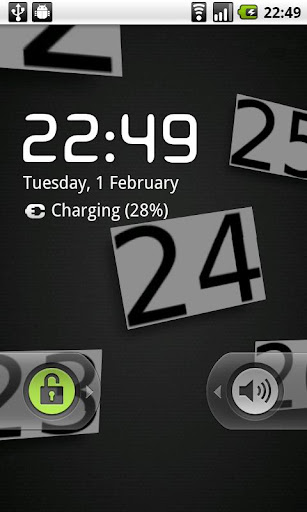
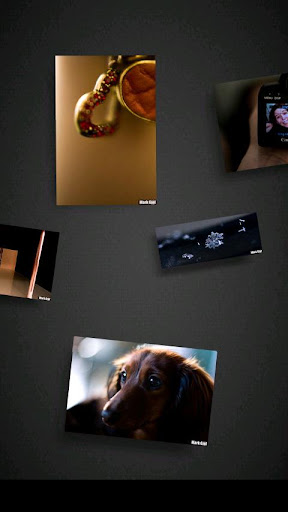
Images float across your screen from Picasa, Flickr, Facebook and your phone.

Animated 3D OpenGL image gallery, Live Wallpaper and Photo Frame. Supports Flickr, Phone, Picasa, 500px and Facebook. Also, multitouch.

Images are flowing by on your screen in a steady stream.

Some people are really happy with it. Give it a shot!

Try pressing "Menu". Lots of exciting stuff behind that button!

Live wallpaper uses battery. If you want it to use less battery, there are a couple of things you can do:

* Disable shadows.

* Use the framerate limiter (it's in the menu somewhere)

* Use local images only.

* Decrease the floating speed.

* Beg me to optimize. It probably won't help, but you will feel like you have contributed!

Download


ForecaWeather 2.0 CyberAndroid

Overview: This is perhap the best weather for Android !
Requirements: Android 2.1+


Foreca Weather provides current conditions, 10 day weather forecasts and weather animations for any location world-wide. You can choose from over 140.000 hand picked locations or you can retrieve forecasts for your current location using your phone’s GPS.


4f06a064a6g5cds.jpg ForecaWeather 2.0 CyberAndroid


 ForecaWeather 2.0 CyberAndroid

Download ForecaWeather v2.0 CyberAndroid


Code:


http://www.filesonic.com/file/XzvpjnX/ForecaWeather.2.0.Android.apk
http://bitshare.com/files/pkwvw9wo/ForecaWeather.2.0.Android.apk.html


pixel ForecaWeather 2.0 CyberAndroid

Battery Notifier Pro BT 1.4.9 CyberAndroid

Battery Notifier Pro BT 1.4.9 CyberAndroid

Overview: Battery Notifier Pro BT, a pro version of Battery Notifier (Big Text), makes it easy to monitor your battery indicator levels with large colored text in the status bar, with additional icon options and alarm notification features requested by users.


Requirements: Android 1.6+


Features :


  • Shows 1% battery percent levels on most Motorola devices (Android 2.2 and above)

  • Three fonts – LcdD, Arial Narrow and MingLiU

  • Custom color options display the colors you want at the levels you want

  • Over twelve additional icon sets available to download for even more status bar options

  • Quiet hours (Mute alarms during certain hours)

  • Mute alerts (Postpone alarms until you want to hear them)

  • Repeat intervals for low AND full battery alarms

  • Quick access to Battery Use, Battery Info and Battery History via Menu

  • Battery temperature/health displays on the Dashboard

  • Choose a custom full charge notification percentage from 70% to 100%

  • Temperature/Voltage and “unplugged/plugged since” info in notification area

  • Temperature in Celsius or Fahrenheit

  • Choice of “smiley with sunglasses” or standard battery icon for full charge notification

  • Addons and battery menu options Honeycomb compatible

If you like Battery Notifier (Big Text), please support the developers by downloading this version. icon smile Battery Notifier Pro BT 1.4.9 CyberAndroid


NOTE FOR MOTOROLA USERS: Included with version 1.4.9 is our 1% “fix” for most Motorola devices which read in 10% increments. Under “Advanced” most Motorola users should see an additional option in the menu “1% increment fix”. With this option checked (OFF by default) Motorola devices that normally only display battery levels in 10% increments, will update every 1%. It has been tested successfully for the Droid 2 and the Atrix, and should work for other Motorola phones as well, such as the Photon.


IMPORTANT: The fix is intended for users who are use a STANDARD battery which comes from Motorola. If you use an extended battery from Motorola, your battery level readings with the fix may not be accurate. We also recommend against using third-party batteries.


NOTE: It has been brought to our attention that the fix does not work on the original Droid (sholes). We are working on a solution. Owners of Motorola devices for which the 1% fix is not needed, such as the Xoom tablet, do not need to check this option for correct operation, and should leave the 1% option unchecked.


Built-in customizable text color levels:
Green:(Default)100-0, Blue:100-0, Orange:50-0, Red:50-0
If colors compete for the same levels, they take precedence in this order: 1) Red 2) Orange 3) Blue 4) Green In other words, red overrides all other colors, orange overrides blue and green, and blue overrides green.


Many tests were run with the paid version of SystemPanel to determine the effect Battery Notifier Pro BT had on the battery. The device was left alone and with the display kept on. In all tests run Battery Notifier Pro BT was consistently at or near the bottom in terms of CPU use. In other words, this app will NOT drain your battery!


NOTE: A2SD (SD card support) functionality is not possible due to necessary background service. But there is no limitation to use A2SD+ (ext partition on rooted phones).


IMPORTANT: Updating to version 1.4.9 from version 1.3.1 or 1.3.0, version 1.4.9 may require an uninstall and reinstall on your device. Previous settings will be lost. This was necessary to enable users to use additional features through addons.


What’s in this version:


  1. Samsung Galaxy S bug fix

87b1b958f9mkd20t.jpg Battery Notifier Pro BT 1.4.9 CyberAndroid


 Battery Notifier Pro BT 1.4.9 CyberAndroid

Download Battery Notifier Pro BT v1.4.9 CyberAndroid


Code:


http://www.filesonic.com/file/HRUX0Hg/Battery.Notifier.Pro.BT.1.4.9.Android.zip
http://bitshare.com/files/jiw9ivjf/Battery.Notifier.Pro.BT.1.4.9.Android.zip.html


Daily Cardio Workout 1.73 CyberAndroid

Overview: Want a great cardio workout in just minutes a day?
Requirements: Android 2.1+


Daily Cardio Workout contains two 5 to 10 minute daily cardio routines for men and women that step you through twenty of the best cardio exercises. These proven exercises, demonstrated by a certified personal trainer, will whip you into shape in no time.
The routine’s simple interface, complete with video and timer, allows you to easily follow along and understand each exercise.


Daily Cardio Workout FULL VERSION features:


  • Two workouts

  • Randomize feature for different daily workouts

  • Ad-free

afe9dab6660aifdf.jpg Daily Cardio Workout 1.73 CyberAndroid


 Daily Cardio Workout 1.73 CyberAndroid

Download Daily Cardio Workout v1.73 CyberAndroid


Code:


http://www.filesonic.com/file/AQCExt3/Daily.Cardio.Workout.1.73.Android.apk
http://bitshare.com/files/duiokvc6/Daily.Cardio.Workout.1.73.Android.apk.html


pixel Daily Cardio Workout 1.73 CyberAndroid

Remote Web Desktop Full 5.6.8 CyberAndroid

Overview: The Best Web Desktop for Android phone!
Requirements: Android 1.5+


The most powerful web desktop for Android phone, the top 10 hottest apps. It provides web-based access to your phone from the comfort of your PC or laptop. It works via a WiFi or USB connection, and some 3G connections.


★ Features
✔ Web SMS: send, read and manage messages in browser. Support long SMS, mass-messages and fake SMS.
✔ File Explorer: manage SD card files and transfer files between phone and computer. Support multiple upload by drag-and-drop (for HTML 5 browser), image viewer, Media Player, etc.
✔ FTP Server: provide a high speed channel to transfer files between phone and computer, enable you to manage sdcard files in Window(s) File Explorer, browser or FTP client.
✔ Remote Control: remote control your android within your computer. Including mouse & keyboard emulation.
✔ WiFi Keyboard: allow you to type on your phone using your computer’s keyboard.
✔ Webcam: turns your phone into a wireless camera, view your camera with web browser (For 2.2+)
✔ Screen Capture: capture phone screen from web (for rooted phone)
✔ Shared Clipboard: share clipboard text between PC and phone.
✔ Wallpaper: set phone wallpaper by upload a picture or online picture.
✔ APK Web Installer: backup apps to SD card, and install APK through File Explorer of web desktop.
✔ Personal Web Server: serve your personal web pages on your phone.
✔ SSL HTTP: provide 512 bits RSA encrypt
✔ Network Bridge: support all ineternet connections (2G/3G/WiFi), access your phone at any place.
✔ Many new features are coming soon.


What’s in this Remote Web Desktop version: 5.6.8
-New web desktop design, Xanders’ help.
-Fixed auto startup on boot bug.


41b7e132a4phuwqw.jpg Remote Web Desktop Full 5.6.8 CyberAndroid


 Remote Web Desktop Full 5.6.8 CyberAndroid

Download Remote Web Desktop Full v5.6.8 CyberAndroid


Code:


http://www.filesonic.com/file/pZnCdXk/Remote.Web.Desktop.Full.5.6.8.Android.apk
http://bitshare.com/files/kqz192js/Remote.Web.Desktop.Full.5.6.8.Android.apk.html


pixel Remote Web Desktop Full 5.6.8 CyberAndroid

PCE.emu 1.4.12 CyberAndroid

Overview: PC Engine/TurboGrafx-16 (TG16) emulator.
Requirements: Android 1.6+


PC Engine/TurboGrafx-16 (TG16) emulator, designed for the Droid/Milestone, but should work on devices with similar or better specs.
Copy your games anywhere to your SD card and browse to them from within the app. It defaults to the root directory of your card upon first run.


Features:


Transfer games anywhere to your SD card and browse to them from within the app (default SD card directory is /mnt/sdcard). Enable the Direct Texture option if supported by your device to increase performance (don’t enable on the Xoom, it’s not needed and simply set frameskip to 0 for full-speed emulation).


What’s in this PCE.emu version: 1.4.12


  • Allow devices without Bluetooth to install the app again

  • D-Pad Deadzone option

580bcf1857cwuvfv.jpg PCE.emu 1.4.12 CyberAndroid


 PCE.emu 1.4.12 CyberAndroid

Download PCE.emu v1.4.12 CyberAndroid


Code:


http://www.filesonic.com/file/jCyl6pw/PCE.emu.1.4.12.Android.apk
http://bitshare.com/files/etihmie0/PCE.emu.1.4.12.Android.apk.html


pixel PCE.emu 1.4.12 CyberAndroid

Related Posts Plugin for WordPress, Blogger...
Twitter Delicious Facebook Digg Stumbleupon Favorites More

 
Design by Free WordPress Themes | Bloggerized by Lasantha - Premium Blogger Themes | Best Web Host