
Advertise

Showing posts with label Education Softwares. Show all posts

Tuesday, December 27, 2011

ezPDF Reader v1.7.1.1 Apk App


Requirements: Android 2.1+
Overview: ezPDF Reader is the Best Selling and the Best Rated Multimedia PDF viewer, annotator, and form filler.

Customized Viewing
Clearly presented without the fluff, documents appear as they would on your PC, but customized to fit your mobile device's screen.
Scanned and text based PDFs are all supported, including JPEG2000 and JBIG2 compression.
Select Text Reflow, Fit to Text Column, Copy and paste text in PDF view and bookmark as you go or Change Reading Direction to ease reading

PDF Form Filler
Good for application forms, school tests, and contracts.
Fill out your Tax Form with ezPDF Reader.
Fill out the contract form, sign with Freehand, and send via email from the file manager (My docs).

Multimedia PDF Viewer - Audio, Video, and TTS (using built-in Text-to-Speech feature)
Get convenient, hassle-free PDFs directly to your Android device with ezPDF Reader.
It also plays multimedia files embedded into PDF.
Perfect solution for PDF based audio/video-enabled Ebooks, such as children's books and instructional books.
(Multimedia file format must be compatible to your Android device, However, no support for Flash)
Use Voice Reading feature to have documents read to you with the continuous automatic page-turning feature.
(It uses TTS feature of the hardware settings)

Annotation Features on PDF - No need to print for marking
Useful tool to add text in text box and sticky notes;
highlight, underline, or cross out texts; draw rectangles, ovals and freehand drawings.
Add memo & image, change color / thickness, resize and move them around as you like.
All these comments are compatible with Adobe® Acrobat®. (PC or Mac version)

Please download "ezPDF Reader Cloud Plugin" App for uploading and downloading files between Google Docs & ezPDF Readeer.

More Features
- Read text based PDF file (using built-in Text-to-Speech function (TTS)), Compatible with SVOX
- Play Embedded Video & Audio (Android device supported format)
- Text View with reflow function. Option for Night / Day Mode, Able to change font size and color (text and background)
- Thumbnail image view
- Support for landscape view
- Search (Options for case sensitive, whole word or part, exact word, and/or operator) and highlighted result
- Auto Fit Zoom for multi-column article or removing white margin
- Scroll lock / unlock
- Able to select text in PDF, save to clipboard, web search, share with other apps
- Support hyperlinks (Go to page within the PDF, URL links to webpage)
- Open Standard Password-protected PDF (Important! If the file is protected with the DRM applied to PDF file, this would not open the file.)
- Intuitive bookmarking & viewing bookmarks with its description and ribbon & thumbnail image
- Auto Page Turn (in secs) or Auto Scroll (up a screen full)
- Table of Contents
- Zoom in & out (Pinch or double tap)
- Page navigation with thumbnail scroll images
- Jump to a specific page by its Page Number
- Able to change reading direction - Good for Arabic, Chinese, Japanese & Hebrew documents
- Undo & Redo button
- Support Trackball
- Page Turning Effect (Flip)
- FREE PDF Conversion Program for PC (link to download)
- 5-finger-tap : Annotation Tool On or Off
- 4-finger-tap : Notification Bar On or Off
- 3-finger-tap : PDF view or Text Reflow view
- 2-finger-tap : Reduces the page to fit the width when enlarged
- 1-finger-tap : Toggles Menu On or Off

What's in this version:
-Rendering Bugfix in specific PDF documents.

Download Instructions:
http://www.MegaShare.com/3809922

Mirrors:
http://www.filesonic.com/file/QNbXpB6
http://www.multiupload.com/LO50EMUK1R

Cool Reader v3.0.54-26 + Cool Reader Gold Donation Apk App


Requirements: Android v2.1+
Overview: eBook reader. Supports epub (non-DRM), fb2, doc, txt, rtf, html, chm, tcr, pdb, prc, mobi (non-DRM), pml formats.

eBook reader. Supports epub (non-DRM), fb2, doc, txt, rtf, html, chm, tcr, pdb, prc, mobi (non-DRM), pml formats.

Pages or scroll view. Page flipping animation.
Table of contents, bookmarks, text search.
Bookmarks on text fragments (comments or corrections) - useful for proof reading.
Export of bookmarks to text file.
Built-in file browser, quick recent books access.
Online catalogs (OPDS) support.
Text to Speech (TTS) support.
Hyphenation dictionaries;
Most complete FB2 format support: styles, tables, footnotes.
Additional fonts support (place .ttf to /sdcard/fonts/)
Support for Chinese, Japanese, Korean languages; autodetection of TXT file encoding (GBK, Shift_JIS, BIG5, EUC_KR).
Day and night profiles (two sets of colors, background, backlight levels).
Brightness adjustments by flick on left edge of screen.
Background texture (stretched or tiled) or solid color.
Paperbook-like page turning animation or "sliding page" animation.
Dictionary support (ColorDict, GoldenDict, Fora Dictionary, Aard Dictionary).
Customizable tap zone and key actions.
Autoscroll (automatic page flipping) - start using menu/goto/autoscroll or assign action Autoscroll on key or tap zone; Change speed using volume keys or bottom-right and bottom-left tap zones; stop - tap any other tap zone or key.
Can read books from zip archives.
Automatic reformatting of .txt files (autodetect headings etc.)
Styles can be customised in wide range using external CSS.
Select text using double tap (optional).

Similar to FBReader, Aldiko, AlReader, Nook, Laputa, Moon+ reader.

Place additional textures to /sdcard/.cr3/textures/ -- to be used as tiled page backgrounds.
Place additional textures to /sdcard/.cr3/backgrounds/ -- to be used as stretched page backgrounds.
(/cr3/ directory can also be used instead of /.cr3/, and internal SD or internal storage instead of /sdcard/)

CoolReader is free, open source (GPL), multiplatform project.
Project homepage on SourceForge is http://sourceforge.net/projects/crengine/
To donate this project, you can buy Cool Reader Gold ($10), Silver ($3) or Bronze ($1) Donation package from Market
PayPal: coolreader.org@gmail.com

Recent changes:
- Hyphenation dictionary for Greek;
- Support for Sony T1 buttons;
- Fixed mode selection - a selection are now always visible when the.
Less description »

Latest version: 3.0.54-26 (for Android version 2.1 and higher, supports App2SD)

Note: Donation file does not add functionality for this application. It serves only to support this project.

Download Instructions:
http://www.filesonic.com/file/Kkmf7lj

Mirror:
http://www.filefat.com/dn2a63jk33xs

MultiReader v1.8.2 Apk App


Requirements: Android 1.6+
Overview: eBook speaker. PDF, EPUB, RTF, PPT,... several languages spoken
MultiReader is an eBook Speaker / eReader.

eBook speaker. PDF, EPUB, RTF, PPT,... several languages spoken

MultiReader is an eBook Speaker / eReader.

eBook formats : PDF, EPUB, text, Word, RTF , Power Point.

Voices : english, spanish, french, portugese, dutch, italian, german, Finnish... all TTS engines (Pico, SVox, eSpeak, ...) , all languages

Access to online libraries.

- Very usefull for students for their lessons. To review for an exam.

- Can be used in assimilating information (eLearning), ie. foreign languages, training techniques.

- People who have difficulties with fine print (blind people).

- Simply listen documents from work or news in your car.

Download Instructions:
http://www.MegaShare.com/3809837
http://www.multiupload.com/K4RW7D9DQF

Wikipedia for Android v0.1.8 Apk App


Requirements: Android 1.6+
Overview: Wikipedia for Android - Mobile Interface to Wikipedia, the Free Encyclopedia with 3,636,000+ articles. Search Wikipedia directly from your home screen.

Is there any one who wants to translate this app into his own language?If so, please send an email to andymike4droid@gmail.com and I will send the resources.Thank you!
Translation thank list:
German Juergen Lilien

Wikipedia for Android features :
- Bookmark classification
- Download wikipedia article
- Support Offline reading
- Support bookmark
- Support App to SD
- Support Find on page
- Enable/Disable navigation bar
- Live search suggestions
- Jump to a random article
- Quick Search Box integration & a search widget
- 150 Wikipedia languages
- Auto detect language
- Adjustable text size
- Copy text from articles
- Share article

Download Instructions:
http://www.filesonic.com/file/u0pUa18/w018.zip
http://www.multiupload.com/6MG4M03MA5

Monday, December 26, 2011

Cool Reader v3.0.54-24 Apk App

This summary is not available. Please click here to view the post.

Cool Reader v3.0.54-24 Apk App

This summary is not available. Please click here to view the post.

ezPDF Reader v1.7.1.0 Apk App


Requirements: Android OS 2.1+
Overview: Multimedia PDF Reader plays video & audio from PDF - Read, Listen and Watch! PDF Viewer - ezPDF Reader - Most Featured and Best Rated (4.60 out of 5.00) Multimedia PDF Viewer (2.1 or up)

- Annotation feature added - Sticky Note (or memo), Activate with a long click on any place in PDF, It could be on text, image, or background. In order to edit, delete or change properties (name of the memo, author, color or even note icon), just tap the memo icon.
- Annotation Features - Highlight, Underline, Strikethrough, and Commenting on annotation. Able to change marking color. --

> More features to come later.
* More annotation features to come later.

* Annotation features are compatible with Adobe Reader (PC version)

- Read text based PDF file (using built-in Text-to-Speech function (TTS)), Comptible with SVOX
- Play Embedded Video & Audio (Android supported format)
- Text View with reflow function. Option for Night / Day Mode, Able to change font size and color (text and background)
- Thumbnail image view
- Search (Options for case sensitive, whole word or part, exact word, and/or operator)
- Auto Fit Zoom for multi-column article or removing white margin
- Scroll lock / unlock
- Able to select text in PDF, save to clipboard, web search, share with other apps
- Support hyperlinks (Go to page within the PDF, URL links to webpage)
- Open Password-protected PDF (Different from DRM applied PDF file)
- Intuitive bookmarking & viewing bookmarks
- Table of Contents
- Zoom in & out
- Page navigation with thumbnail scroll images
- Jump to a specific page
- Able to change reading direction - Good for Arabic, Chinese, Japanese & Hebrew documents
- Support Trackball
- FREE PDF Conversion Program for PC (link to download)

What's in this version:
1.7.1.0
Improved image interpolation.
New Setting, [Display Type of Recent]. You can choice Bookcase or List.
Stablilization and Bugfix.
1.7.0.0
New bookshelf style display for Recently Opened Documents Tab
Able to send email from PDF, [More(...) - Send To - Choose your Email client]
Able to send to other apps from PDF
Improved performance
Bug fixed

Download Instructions:
http://www.filesonic.com/file/oQr46CL

Mirror:
http://www.MegaShare.com/3808158
http://ul.to/6rlfjtcw

Calculator++ v1.2.21 Apk App

This summary is not available. Please click here to view the post.

Calculator++ v1.2.21 Apk App


Requirements: Android v2.1+
Overview: Calculator++ is an advanced, modern and easy to use scientific calculator #1.

Calculator++ is an advanced, modern and easy to use scientific calculator #1.
Calculator++ is all you need - it helps you to do basic and advanced calculations on your mobile device.
Calculator++ is the modern calculator for everyone: scientists, accountants, students.
Features:
++ easy to use
+ no need to press equals button anymore - result is calculated on fly
+ smart cursor positioning
+ several kinds of brackets
+ copy/paste in one button
+ landscape/portrait orientations
++ drag buttons up or down to use special functions, operators etc
++ modern interface with possibility to choose themes (currently 3 themes available)
+ highlighting of expressions
+ history with all previous calculations and undo/redo buttons
++ variables and constants support (build-in and user defined)
++ complex number computations
+ support for lots of functions: sin, sinh, asin, asinh, ln, sqrt etc
++ expression simplification: use 'identical to' sign (≡) to simplify current expression (2/3+5/9≡11/9, √(8)≡2√(2))
+ support for android 1.6 and higher
+ open source
+ Russian and English interfaces

Hints:
1. You can omit unnecessary multiplication signs (instead of 3*t or t*sin(Ï€*t) just type 3t or tsin(Ï€t))
2. Use ≡ (in the top right corner of = button) to simplify expression
3. Just click on the result to copy it to the clipboard
4. Use = button seldom - result is calculating on the fly
4. Add constants for often used values (you can even save expressions)

FAQ

How can I use functions written in the top right and bottom right corners of the button?
Push the button and slide lightly up or down. Depending on value showed on the button action will occur.

How can I toggle between radians and degrees?

To toggle between different angle units you can either change appropriate option in application settings or use the toggle switch located on the 6 button (current value is lighted with yellow color).
Also you can use deg() and rad() functions and ° operator to convert degrees to radians and vice versa.

Examples:
268° = 4.67748
30.21° = 0.52726
rad(30, 21, 0) = 0.52726
deg(4.67748) = 268

Does C++ support %?
Yes, % function can be found in the top right corner of / button.

Examples:

100 + 50% = 150
100 * 50% = 50
100 + 100 * 50% * 50% = 125
100 + (100 * 50% * (25 + 25)% + 100%) = 150

Note:

100 + (20 + 20)% = 140, but 100+ (20% + 20%) = 124.0
100 + 50% ^ 2 = 2600, but 100 + 50 ^ 2% = 101.08

Does C++ support fractional calculations?
Yes, you can type your fractional expression in the editor and use ≡ (in the top right corner of = button). Also you can use ≡ to simplify expression.

Examples:

2/3 + 5/9 ≡ 11/9
2/9 + 3/123 ≡ 91/369
(6 - t) ^ 3 ≡ 216 - 108t + 18t ^ 2 - t ^ 3

Does C++ support complex calculations?
Yes, just enter complex expression (using i or √(-1) as imaginary number).

Examples:

(2i + 1) ^ = -3 + 4i
e ^ i = 0.5403 + 0.84147i

Can C++ plot graph of the function?
Yes, type expression which contains 1 undefined variable (e.g. cos(t)) and click on the result. In the context menu choose 'Plot graph'.

Does C++ support matrix calculations?
No, it doesn't

Why I've got 1.76732452452345E-17 instead of 0?
Check the 'Round result' preference in application settings - it should be turned on.

Recent changes:
- Release notes screen added;
- Added categories in functions and constants screens;
- Additional actions are available for constants, functions and operators (long click on the item and choose from context menu);
- Logarithm function added - calculate logarithm of any base;
- Back button preference;
- Variant of π constant independent from angle units.
Less description »

Latest version: 1.2.21 (for Android version 2.1 and higher, supports App2SD)

Download Instructions:
http://www.filesonic.com/file/PLlJcGi

Mirror:
http://filepost.com/files/e7492466

Sunday, December 25, 2011

Document Scanner v2.8 Apk App


Requirements: Android OS 1.5 +
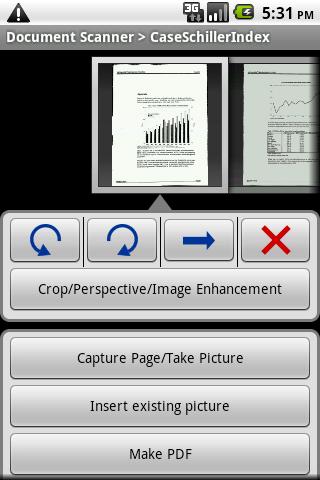
Overview: Scan docs,convert to PDF. Email/upload to GDocs/Dropbox/Evernote to share/store.


Scan documents and receipts with your phone camera, convert them to PDF. It is a portable scanner for your Droid.
*email PDF or upload it to DROPBOX/GOOGLE DOCS/EVERNOTE
*OCR Option through GDocs/Evernote
*create folders
*no page limit
*scan and add pages later to an existing folder
*insert existing gallery image
*compression and page size options
*reorder pages
*quick one-page option to take a picture and upload as PDF with a single click
*Correct perspective and crop your captured image. The app detects the four corners automatically and gives you an opportunity to modify it
*Enhance image and convert to gray scale (or black/white) as desired

What's in this version:
2.7.1: bug fix- 7 is now allowed in file names!

Download Instructions:
http://www.filesonic.com/file/aTwqu8u

Mirror:
http://www.MegaShare.com/3806576
http://www.multiupload.com/XIYYZ5ER76

Saturday, December 24, 2011

Nook PDF Reader v1.6.2 Apk App


Requirements: Android 1.5+
Overview: PDF Reader based on vudroid - (djvu and pdf viewer) with enhanced design and new features

Correct Fonts, simple gui elements
Supports Nook Reader keyboards (configured)
Scroll pages by tap on the screen
Scroll pages by volume keys (configured)
Fixate pages by width
Scan device for new books
Double tap to hide show gui elements

Download Instructions:
http://www.filesonic.com/file/cmG68os/c ... -1.6.2.apk 

Friday, December 23, 2011

Practice English Grammar 1 v0.9.7 Apk App


Requirements: Android >=2.1
Overview:

Practice English Grammar (Beginner Level) helps you learn English grammar by practicing interactive grammar exercises.
Practice English Grammar (Beginner Level) contains many pages of grammar lessons explaining the grammar topics of the tests. With over 500 questions in 16 topics, this app helps you practicing the basic usage of English grammar in elementary level.
The following topics are covered in this app:
To be: am/are/is
Question with question words
Possessive Adjectives
Nown
Have/Has
Present Simple
Articles
Adjectives
Adverbs
Pronoun
There is/There are
This/These and That/Those
Some and Any
Past Simple
Modal Verbs
Present Continuous
Future
Other topics of english grammar will be included in other app of the “Practice English Grammar (Beginner Level)” app series.
Tests in “Practice English Grammar (Beginner Level)” have not only multiple choice questions but also other interactive question types such as multiple response, matching, fill in the blank, text response numeric response etc.. . Some questions contain also media contents such as images , audios, videos which make your learning sessions more fun and interactive.
Comprehensive statistics help you monitoring your progress, so that you do not learn the same things again and again but something new.
This app will be constantly updated with new contents, and tests which help you continually refreshing your knowledge.

Download Instructions:

http://www.mediafire.com/?5n1dg4i224x9lbu

Thursday, December 22, 2011

3D graph OpenGL v1.3.4 Apk App

 Requirements: Android 1.6+
Overview: 3D graph is program for drawing mathematical equations in form of 3D graph. You can write whatever equation you like and use variables x and y as you like

3D graph is program for drawing mathematical equations in form of 3D graph. You can write whatever equation you like and use variables x and y as you like. You enter equation in text box at the top of the screen and press Draw button to draw it. You can then rotate 3D graph by moving finger across the screen and zoom in and out with + and - buttons at the bottom of the screen. There are some predefined great looking equations available by opening menu and select Favorites option. You can add equation to list of favorites with star button, and take picture of it with camera button which will be saved to 3DGraph folder on SD card. You can use settings menu option to fine tune your 3D graph. Home page: http://goo.gl/mldKM

Version 1.3.4
- added input values range chacking
- optimized performance

Version 1.3.3
- fixed bug while taking screen-shot
- fixed equation wrapping in favorites dialog
- enable move to SD-card option

Version 1.3
- switched to min3d OpenGL library (hopefuly lights will work now as they should)
- added option to make lights visible
- added option to draw graph with lines or dots
- optimized icons for all resolutions
- added X,Y,Z axes
- added version selector to choose between notification or classical ads
- optimized screen capturing code
- minor UI optimizations

Version 1.2.1
- added option to disable notification bar push Ads

Version 1.2
- minor bug fixes
- improved ad display module
- added Chinese translation
- added Taiwanese translation

Version 1.1
- fixed error when drawing functions like 1/(x*y)
- fixed uppercase/lovercase error with equations
- added contact and home page in about box

Download Instructions:
http://www.MegaShare.com/3801863

Wednesday, December 21, 2011

Adobe Reader v10.1.1 Apk App


Requirements: Android 2.2+
Overview: The global standard for reliably viewing and sharing PDF documents

Adobe Reader is the free global standard for reliably viewing and sharing PDF documents across platforms and devices. Easily and efficiently access the widest range of PDF file types—including PDF Portfolios, password-protected PDF documents and Adobe LiveCycle rights-managed PDF files. Adobe Reader offers fast, high-quality interaction with PDF files on your Android smartphones and tablets.

View PDF files
• Quickly open PDF files from email , the Web or files stored on your device
• View PDF Portfolios, PDF Packages, annotations and drawing markups
• Read text annotations such as Sticky Notes

Access encrypted PDF files
• Open and view password-protected PDF files
• Access files secured by Adobe LiveCycle Rights Management, which helps protect sensitive documents
• Supports the highest grade of PDF encryption, up to AES256

Interact with PDF files
• Search text to find specific information
• Use bookmarks to jump directly to a section in your PDF file
• Select single page or continuous scroll modes
• Easily zoom in on text or images for a closer view
• Quickly navigate through large files using thumbnails
• Select and copy text from a PDF file to the clipboard

Share files
• Share PDF files with other applications including sending PDF documents as email attachments

Available languages
English, Chinese Simplified, Chinese Traditional, French, German, Italian, Japanese, Korean, Spanish, Dutch, Danish, Portuguese, Swedish, Russian, Czech, Polish and Turkish

Price
Adobe Reader for Android is a free app

By clicking "Install" I agree to the License Agreement terms at http://www.adobe.com/products/eulas/

What's new in this version:

Reflow text has been reinstated
• Support for PDF Attachments
• View any Portfolio or Attachment content for which you have a viewing application installed
• Maintain the last read position of recently opened documents
• Fixed some Android 4 incompatibilities
For more information, refer to the Reader Mobile blog at http://adobe.ly/o1abub


Download Instructions:
http://dl.free.fr/getfile.pl?file=/nhYckkgD

Mirrors:
http://www.fufox.net/?d=0871D28785FE
http://ffyals.1fichier.com/
http://uptobox.com/3dz11cyt21t2
http://www.uploadking.com/QYN14GJHVD
http://www.megaupload.com/?d=3TAL3D0Z
http://www.wupload.com/file/2621413057
http://www.uploadstation.com/file/64DRRAZ
http://depositfiles.com/files/783s1aab0
http://www.uploadhere.com/WPA64AEWK0
http://www.mediafire.com/?xe2c7pgzbbj87tl
http://www.uploadbaz.com/k2v3m1nqkzlh

Related Posts Plugin for WordPress, Blogger...
Twitter Delicious Facebook Digg Stumbleupon Favorites More

 
Design by Free WordPress Themes | Bloggerized by Lasantha - Premium Blogger Themes | Best Web Host